

Path: blob/main/quantum-applications-to-finance/01_quantum_walks.ipynb
1148 views
Quantum Walks for Finance Part 1: Introduction to Discrete Time Quantum Walks
---
Overview
This tutorial serves as an introduction to quantum walks, using the discrete time quantum walk as an example. It prepares you for the next tutorial, where we will apply quantum walks to a finance problem. You will learn about quantum walks by comparing them to classical random walks. By the end of the tutorial, you will have coded a variational discrete time quantum walk in CUDA-Q, setting the stage for exploring more advanced walking protocols and parameter optimization in the next notebook.
What you'll do:
Review CUDA-Q programming syntax
Compare classical random walks with a discrete time quantum walk
Develop and implement a kernel with custom gates for a discrete time quantum walk along a line segment
CUDA-Q syntax you'll use:
quantum kernel function decoration:
@cudaq.kernelqubit initialization:
cudaq.qvectorandcudaq.qubitquantum gates:
x,h,t, _.ctrl,cudaq.register_operationexecute a kernel:
sample,get_state, _.amplitudevisualize circuit structure of a kernel:
cudaq.draw
Pre-requisites: Learners should have familiarity with Jupyter notebooks and programming in Python and CUDA-Q. It is assumed the reader has some familiarity already with quantum computation and is comfortable with braket notation and the concepts of qubits, quantum circuits, measurement, and circuit sampling. The CUDA-Q Academic course entitled "Quick Start to Quantum Computing with CUDA-Q" provide a walkthrough of this prerequisite knowledge if the reader is new to quantum computing and CUDA-Q or needs refreshing.
🎥 You can watch a recording of the presentation of a version of this notebook from a GTC DC tutorial in October 2025.
First let's install the necessary packages.
CUDA-Q Basics
Let's start with a brief overview of CUDA-Q syntax, which will be utilized throughout this tutorial
Defining quantum kernels and custom gates
Quantum kernels are functions that can be executed on quantum hardware, and in Python, these are marked with the @cudaq.kernel decorator.
For instance, you might want to create a quantum kernel that initializes a few qubits and applies specific gate operations to them. CUDA-Q offers several pre-defined gates, which you can explore in detail here. As demonstrated in the following example, you can also define custom gate operations from a unitary matrix using the register_operation command. Additionally, it is possible to create operators controlled by a control qubit.
Let's see how to create a kernel in CUDA-Q. We'll initialize 2 qubits in the zero state using cudaq.qvector and apply a bit flip gate followed by a custom -gate to the first qubit and apply a Hadamard gate to the 2nd qubit, and a controlled -gate between the two qubits. Here's how to define and visualize this kernel using cudaq:
The kernel in the previous code block defined a quantum circuit, but we can also use kernels to define operations on qubits. We'll see an example of this in the next section when we define the kernel initial_position which accepts as input a list of qubits with type cudaq.qvector (orcudaq.qview).
Executing a quantum kernel
To get the state of the qubits after executing the kernel, we can use either cudaq.sample or cudaq.get_state:
Discrete Time Quantum Walks
This section will prepare us for Quantum Walks for Finance Part 2, where we address the following problem:
Encoding Probability Distributions Problem: Given a discrete probability distribution , generate a quantum kernel (i.e., a sequence of quantum gates) that transforms an initial state into a final state whose measurement outcomes match the target distribution .
One approach to tackle this problem is through random walks by using a variational algorithm to search for the random walk that will generate a targeted distribution, as depicted in the animation below.
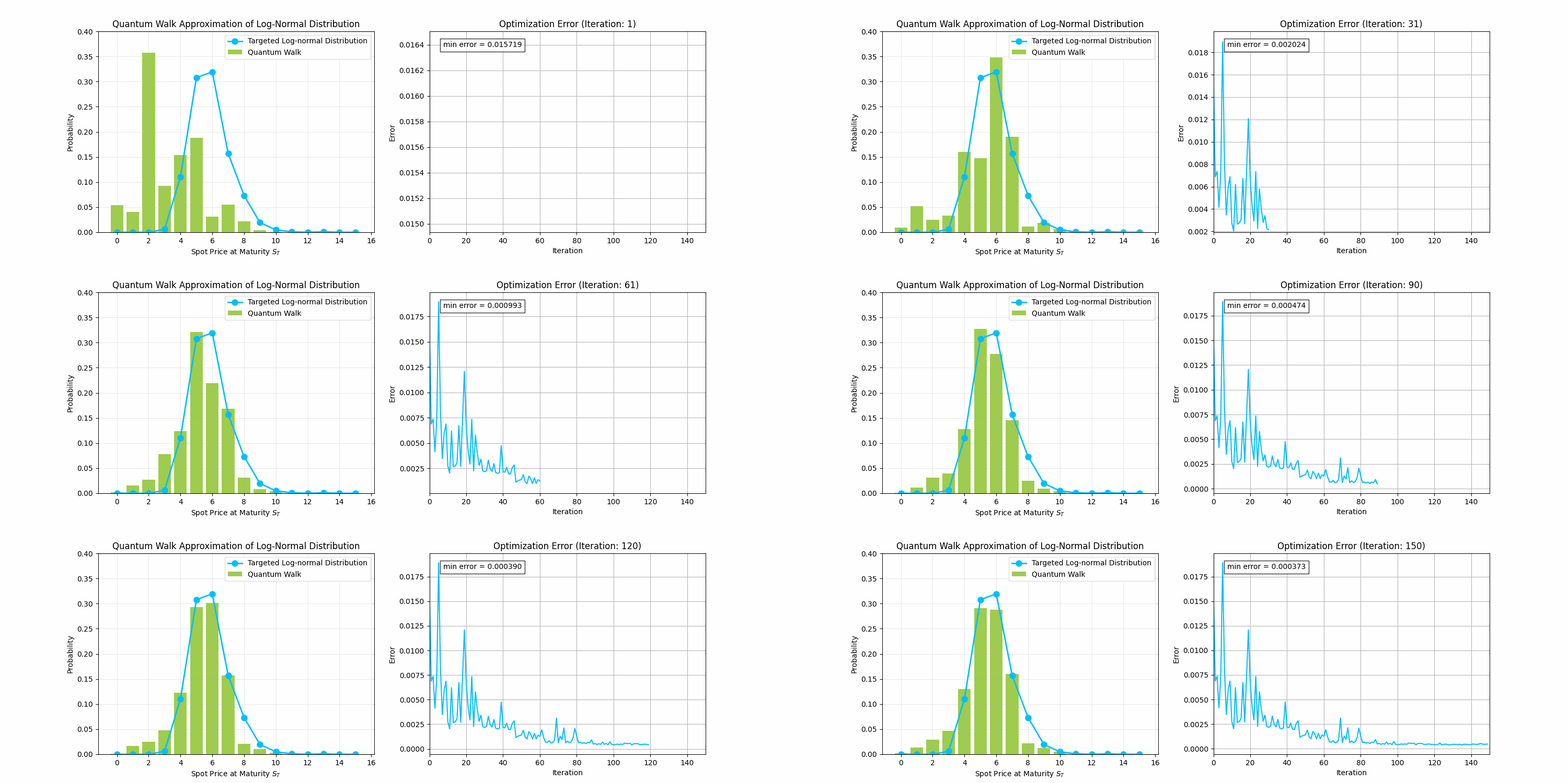
Before we tackle that problem, we need to define quantum random walks. Let's first visualize a classical random walk along a number line generating a binomial distribution. You can imagine a walker moving left or right depending on the result of a coin flip.
Let's see this in action with the random walk widget below. The green dot represents the walker whose movements are dictated by flips of a coin whose fairness is controlled by the probability slider. The ending position from each run of the experiment is recorded in the histogram. Experiment by changing the number of total steps, the probabilities, and the rules for taking a step. What patterns do you notice?
Note: If the widget does not appear below, you can access it directly using this link.
Unlike classical random walks, where probabilities dictate movement, quantum walks rely on amplitudes. Interference between paths leads to a faster spread over the position space, making quantum walks useful for generating more complex probability distributions.
We start this section by defining classical random walks and discrete-time quantum walks (DTQW). In the following section, we use CUDA-Q to encode an example of a DTQW into a CUDA-Q kernel.
Comparing Classical Random Walks with Discrete Time Quantum Walks
Let's consider a discrete walk taking place on a line. In this scenario, we envision a walker progressing along the x-axis in discrete increments, with the movement governed by predefined rules based on coin flips. A classical random walk can be viewed as a decision tree, as in the diagram below. Here, a walker begins in the center of the line. After a coin flip, the walker moves to the left or right depending on the outcome of the coin flip (e.g., flipping heads will send the walker one step to the left, while flipping tails will send the walker one step to the right). After coin flips, we record the position of the walker. This experiment is repeated multiple times to generate a histogram of the walker's final position.

A discrete-time quantum walk (DTQW) is the quantum analogue of a classical random walk. In this scenario, both the position of the walk and the coin are represented as quantum states, and , respectively. Throughout this walk, the state of the walker changes according to quantum shift operators () which depend on the state of the coin . In particular, the operation checks if in the state (i.e., heads) and if so, induces a shift left operation on the quantum walker. Similarly, is defined for tails and shifting right. At each time step, the state of the coin changes (i.e., is "flipped") via a quantum operation (), which we'll call the coin-flip operator. Unlike the classical random walk, we will not know the position of the walker until the end of the process, when the quantum state of the walker is measured.
In the diagram below, we illustrate a 2-step quantum walk where the coin-flip operator is the Hadamard gate. Notice how the final distribution of the walker's possible positions differs from the classical case.

The Line that the Walker Traverses
For our example, we consider a line that contains positions: encoded with the computational basis states on qubits: . In other words, the computational basis state represents the location on the line.
The Walker's Position State
The walker's position after time steps is given by a linear combination of the computational basis states for some satisfying . For instance, if the walker began the experiment at position , then the state of the walker at time would be .
More interestingly, the walker might begin the experiment in a superposition of two or more positions, as depicted in the figure below. In this case, the walker's initial state is . The aim of this section is to encode into CUDA-Q the first step of the discrete time quantum walk drawn below.

Programming a DTQW with CUDA-Q
Let's start coding up one step of the DTQW in CUDA-Q. The circuit diagram for this is the following:

Exercise 1:
The first step is to edit the code block below to create a kernel that generates the walker's initial position state: using an (() in CUDA-Q) gate and gates . Define a kernel that prepares the walker qubits in an equal superposition of the states = and = .
We can verify that our solution is correct by using the cudaq.get_state and _.amplitudes commands. Additionally, in the code block below, we will create a helper function to graph the distribution of the walker's positions, as represented by the state.
Walking the Line
The next step (no pun intended) is to define incrementer (INC) and decrementer (DEC) operations, which will change the state of the walker with shifts to the left and right on the number line, respectively. We'll use these operations to build up the shift operators and which depend on the state of the coin. First, let's define INC so that when applied to a basis state , the result is for . The unitary matrix below carries out this transformation:
[ ]
Using the cudaq.register_operation we can create a custom gate for this unitary matrix. The code block defines a cudaq.kernel to carry out the custom INC gate, and conducts a test to verify that the operation acts as expected on the zero state.
Exercise 2:
Using the fact that DEC` is the inverse of , create a kernel for a custom operation. Define a kernel on 4 qubits for the DEC operation that maps to mod 16 and verify that it works as expected for .
Avoiding Walking in Circles
It is important to note that, as currently outlined, we are on track to define a quantum walk that will allow a walker to move between positions and in one step. This behavior might not be desired, for instance, in a financial application where the positions of the walker represent stock prices and movement is related to positive or negative investor sentiment.
To prevent one-step transitions between and , we use an auxiliary qubit (endpoint_qubit), Toffoli gates, CNOT gates, and a mid-circuit reset to ensure a coin in the state does not trigger a shift right (INC) when the walker is at , and a coin in the state does not trigger a shift left (DEC) when the walker is in the state . This process is depicted below for one step of the DTQW:

The corresponding functions to prevent one-step transitions between and are defined below.
The State of the Coin
Not only is the position of the walker at any given time step a linear combination of the computational basis states, but also the coin is a linear combination of heads:
and tails:
and depends on : for with For example, we might begin the experiment with a coin in the zero (heads) state: . Another option would be to start the experiment with the coin in a state of superposition of both heads and tails: .
Changing the State of the Coin
The flipping of the coin is carried out by a quantum operation, . If the coinflip operation is the bitflip operation, , and the initial state of the coin is , then, flipping the coin would just change the state from to — much like the classical random walk.
A common and more interesting quantum coinflip operation is the Hadamard operator, , as illustrated in the diagrams of the DTQW above. Applying this operator iteratively to the coin in the initial state , will result in alternating coin states and .
We're not limited to constant coin operators, and could consider a coin operator that depends on parameters such as the Grover operator used for searching a graph for marked vertices (Li and Sun, or for an exposition Wong). Moreover, the coin operator might depend on parameters that change from one step to the next and can be learnable, as we'll see in the next tutorial.
Changing the State of the Walker Based on Coin Flips:
Now, we're ready to put all of these kernels together to program one step of the DTQW. Let's set the initial state of the walker to be . The steps and , which depend on the state of the coin, can be modeled with controlled-gates and the INC and DEC operations, respectively. We've defined the step below. How would you edit the code to call up the DEC operator when the coin qubit is in the state?
Exercise 3:
Complete the code below to define . will apply the DEC operation to the walker qubits when the coin qubit is in the state.
Does the output match what you expect? Experiment with different initial states of the coin and walker qubits and different coin operators.
In the next notebook, Quantum Walks for Finance Part 2: Learnable Quantum Walk in Financial Simulation, we'll extend this idea allowing for parameterized coinflip operations, and introduce the idea of a split step. These will allow us to generate more interesting probability distributions than what we can do with the DTQW, which may better model financial data.