

Path: blob/main/docs/sources/static/configuration/integrations/cloudwatch-exporter-config.md
5383 views
------cloudwatch_exporter_config
Overview
The cloudwatch_exporter_config block configures the cloudwatch_exporter integration, which is an embedded version of YACE. Use the cloudwatch_exporter to collect AWS CloudWatch metrics.
This integration lets you scrape CloudWatch metrics in a set of configurations that we will call jobs. There are two kind of jobs: discovery and static.
Authentication
The agent must be running in an environment with access to AWS. The exporter uses the AWS SDK for Go and provides authentication via AWS's default credential chain. Regardless of the method used to acquire the credentials, some permissions are needed for the exporter to work.
The following IAM permissions are required for the Transit Gateway attachment (tgwa) metrics to work.
The following IAM permission is required to discover tagged API Gateway REST APIs:
The following IAM permissions are required to discover tagged Database Migration Service (DMS) replication instances and tasks:
To use all of the integration features, use the following AWS IAM Policy:
Configuration options
Configuration reference:
discovery_job
A discovery job allows one to just define the AWS service to scrape, and the metrics under that service/namespace to retrieve. The agent will find AWS resources in the specified service for which to scrape these metrics, label them appropriately, and export them to Prometheus. For example, if we wanted to scrape CPU utilization and network traffic metrics, from all AWS EC2 instances:
Configuration reference:
static_job
A static job allows one to scrape an individual CloudWatch metric. For that, metrics needs to be fully qualified, specifying the following:
namespace: For exampleAWS/EC2,AWS/EBS,CoolAppif it were a custom metric, etc.dimensions: CloudWatch identifies a metrics by a set of dimensions. For example, allAWS/EC2metrics are identified by theInstanceIddimension.metrics: Metric name and statistics.
For example, if one wants to scrape the same metrics in the discovery example, but for a specific AWS EC2 instance:
All dimensions need to be specified when scraping single metrics like the example above. For example AWS/Logs metrics require Resource, Service, Class, and Type dimensions to be specified. Same applies to CloudWatch custom metrics, all dimensions attached to a metric when saved in CloudWatch are required.
Configuration reference:
aws_role
Represents an AWS IAM Role. Required when configuring a job. If omitted the AWS role that the credentials configured in the environment posses will be used.
This is useful when scraping metrics from different AWS accounts with a single pair of credentials. In this case, a different role is configured for the agent to assume prior to calling AWS APIs, therefore, the credentials configured in the system need permission to assume the target role. See this documentation on how to configure this.
aws_dimension
Represents an AWS CloudWatch Dimension.
aws_tag
Represents an AWS Tag.
metric
Represents an AWS Metrics to scrape, under the context of a job. To see available metrics, AWS does not keep a documentation page with all available metrics. Follow this guide on how to explore metrics, to easily pick the ones you need.
Period
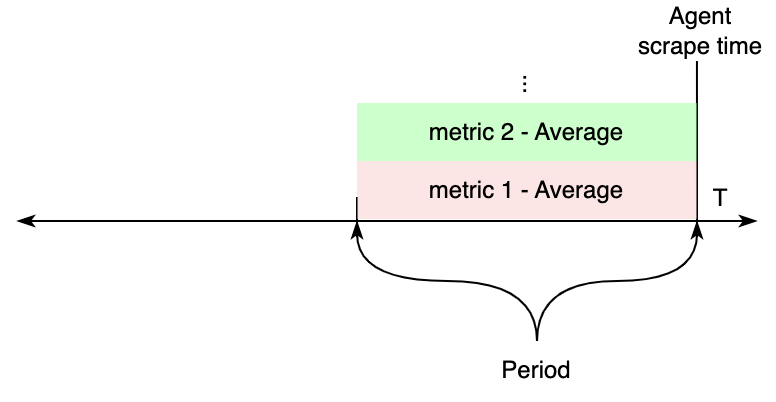
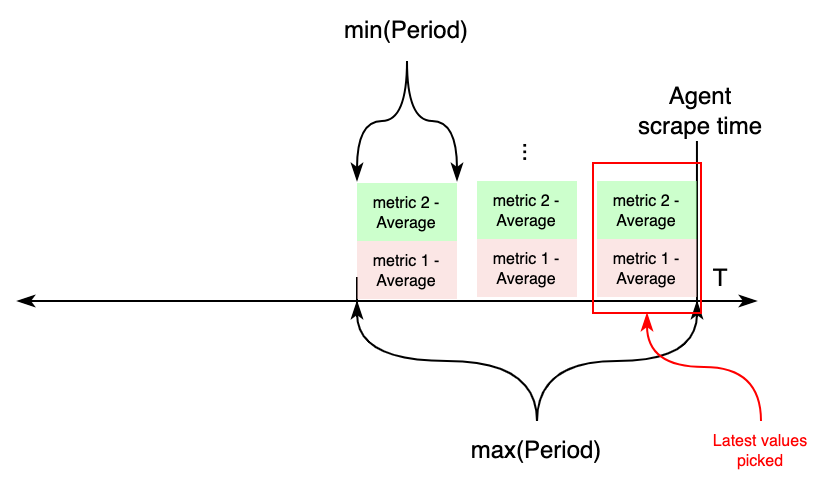
Period controls how far back in time CloudWatch metrics are considered, during each agent scrape. We can split how these settings affects the produced values in two different scenarios.
If all metrics within a job (discovery or static) have the same Period value configured, CloudWatch APIs will be requested for metrics from the scrape time, to Periods seconds in the past. The values of these are exported to Prometheus.
On the other hand, if metrics with different Periods are configured under an individual job, this works differently. First, two variables are calculated aggregating all periods: length, taking the maximum value of all periods, and the new period value, taking the minimum of all periods. Then, CloudWatch APIs will be requested for metrics from now - length to now, aggregating each in samples for period seconds. For each metrics, the most recent sample is exported to CloudWatch.
Supported services in discovery jobs
The following is a list of AWS services that are supported in cloudwatch_exporter discovery jobs. When configuring a discovery job, the type field of each discovery_job must match either the desired job namespace or alias.
Namespace:
AWS/CertificateManageror Alias:acmNamespace:
AmazonMWAAor Alias:airflowNamespace:
AWS/ApplicationELBor Alias:albNamespace:
AWS/AppStreamor Alias:appstreamNamespace:
AWS/Backupor Alias:backupNamespace:
AWS/ApiGatewayor Alias:apigatewayNamespace:
AWS/AmazonMQor Alias:mqNamespace:
AWS/AppSyncor Alias:appsyncNamespace:
AWS/Athenaor Alias:athenaNamespace:
AWS/AutoScalingor Alias:asgNamespace:
AWS/ElasticBeanstalkor Alias:beanstalkNamespace:
AWS/Billingor Alias:billingNamespace:
AWS/Cassandraor Alias:cassandraNamespace:
AWS/CloudFrontor Alias:cloudfrontNamespace:
AWS/Cognitoor Alias:cognito-idpNamespace:
AWS/DMSor Alias:dmsNamespace:
AWS/DDoSProtectionor Alias:shieldNamespace:
AWS/DocDBor Alias:docdbNamespace:
AWS/DXor Alias:dxNamespace:
AWS/DynamoDBor Alias:dynamodbNamespace:
AWS/EBSor Alias:ebsNamespace:
AWS/ElastiCacheor Alias:ecNamespace:
AWS/EC2or Alias:ec2Namespace:
AWS/EC2Spotor Alias:ec2SpotNamespace:
AWS/ECSor Alias:ecs-svcNamespace:
ECS/ContainerInsightsor Alias:ecs-containerinsightsNamespace:
AWS/EFSor Alias:efsNamespace:
AWS/ELBor Alias:elbNamespace:
AWS/ElasticMapReduceor Alias:emrNamespace:
AWS/EMRServerlessor Alias:emr-serverlessNamespace:
AWS/ESor Alias:esNamespace:
AWS/Firehoseor Alias:firehoseNamespace:
AWS/FSxor Alias:fsxNamespace:
AWS/GameLiftor Alias:gameliftNamespace:
AWS/GlobalAcceleratoror Alias:gaNamespace:
Glueor Alias:glueNamespace:
AWS/IoTor Alias:iotNamespace:
AWS/Kafkaor Alias:kafkaNamespace:
AWS/KafkaConnector Alias:kafkaconnectNamespace:
AWS/Kinesisor Alias:kinesisNamespace:
AWS/KinesisAnalyticsor Alias:kinesis-analyticsNamespace:
AWS/Lambdaor Alias:lambdaNamespace:
AWS/MediaTailoror Alias:mediatailorNamespace:
AWS/Neptuneor Alias:neptuneNamespace:
AWS/NetworkFirewallor Alias:nfwNamespace:
AWS/NATGatewayor Alias:ngwNamespace:
AWS/NetworkELBor Alias:nlbNamespace:
AWS/PrivateLinkEndpointsor Alias:vpc-endpointNamespace:
AWS/PrivateLinkServicesor Alias:vpc-endpoint-serviceNamespace:
AWS/Prometheusor Alias:ampNamespace:
AWS/RDSor Alias:rdsNamespace:
AWS/Redshiftor Alias:redshiftNamespace:
AWS/Route53Resolveror Alias:route53-resolverNamespace:
AWS/Route53or Alias:route53Namespace:
AWS/S3or Alias:s3Namespace:
AWS/SESor Alias:sesNamespace:
AWS/Statesor Alias:sfnNamespace:
AWS/SNSor Alias:snsNamespace:
AWS/SQSor Alias:sqsNamespace:
AWS/StorageGatewayor Alias:storagegatewayNamespace:
AWS/TransitGatewayor Alias:tgwNamespace:
AWS/VPNor Alias:vpnNamespace:
AWS/WAFV2or Alias:wafv2Namespace:
AWS/WorkSpacesor Alias:workspaces