

Path: blob/main/Lesson 3 - Numerical calculus.ipynb
1126 views
Lesson 3 - Numerical calculus
Authors:
Yilber Fabian Bautista
Keiwan Jamaly
Julia Lienert
Sean Tulin
In this lecture, we will cover methods for calculating derivatives and integrals numerically. While we will cover some of the theory behind these methods, the main practical takeaway is to gain familiarity with existing functions within the numpy and scipy libraries that implement these tasks. In Python, most basic tasks have been coded up already in a very efficient way, so knowing your way around Python's libraries saves a lot of work. We have already introduced numpy. scipy is another important and vast library with many algorithms for scientific computing.
By the end of this lecture you will be able to:
Do numerical differentiation and understand the principles behind it.
Perform basic numeric integration using python integration libraries
Use several integration techniques including: the rectangle, trapezoidal, and Simpson's rules.
Do numerical integration in 1 dimensions using quadratures using
scipy(quad)Perform higher dimensional integrals using
scipydblquad, tplquad
Numerical Differentiation
Differentiation is a fundamental tool in science. Naively one would expect the usual derivative definition will be used for numerics, that is
Expanding around we verify, that it is indeed the differential of .
As we can see, the numerical errors propagates with . This is a good approximation to start with, however we can do better by simply changing our definition of the differential and expanding around This is called the central difference formula and is primarily used for any numerical differentiation, where now the numeric errors propagate as
Exercise 1
Using the techniques from above, prove that
Differentiation with scipy and numpy
The above numeric differentiation techniques are already implementations in scipy and numpy libraries. The two functions have different applications.
scipy.misc.derivative for calculating derivatives of known functions. That is, you can know what is and can calculate it at any point , and you want to calculate its derivative at a specific point.
numpy.gradient for calculating derivatives of unknown functions, where you know only on a grid of specific points .
Both functions use the central difference formula.
Example with scipy.misc.derivative
SciPy has the function scipy.misc.derivative, which allows us to directly compute the derivative of an analytic function. The syntax for using scipy.misc.derivative function is the following:
where func is the given function, x0 the point the derivative is calculated at, and dx is a float for spacing, in our previous formulas dx=h.
Let us see an specific example:
From analytic differentiation, we would have expected , and evaluating at will produce . The difference with our numeric differentiation is then
We can see this is a number approximately of order as expected from the central difference formula.
Example with numpy.gradient
Now, suppose we do not having a known function , but only data points are known on a grid of points in . The derivative at each point is calculated using the formula of the centered derivative. Since both the leftmost and rightmost point do not have two neighbouring points, their derivatives are calculated using the forward (for the leftmost point) and the backward (for the rightmost point) derivative.
numpy includes the function np.gradient that does the job for us, provided an array with data points is given. The syntax is
where f is the array with the data points and dx is the spacing between the data points.
Notice that the numpy functions for taking derivatives only work for data points given as arrays but not for specific functions. For the latter case, one has to use scipy.misc.derivative.
Also note that f need not be a one-dimensional array or list. If is a vector function, evaluating on a grid of points will yield a 2D array. Then np.gradient will return an object of the same shape, representing the gradient at each grid point .
Let us see an specific example of how to use the np.gradient function in practice

Exercise 2
Compute analytically derivative of and evaluate it at the given x-array. Convince yourself that the difference of this result and the numeric derivative deriv_f is approximately of order . In addition, evaluate the derivative using the scipy.misc.derivative, and compute the difference of this result and the previous two methods of computation. Plot the analytic, and the two numeric derivatives in a scale that makes visible their differences.
Exercise 3 (optional)
To get more practice at the computation of numerical derivatives with Python:
Calculate the derivative of the function at the point both analytically (by hand + using your calculator) and numerically (using and ). Compare the results. What do you expect to change when using different values for ?
Calculate the derivative of the function at the point both analytically (by hand + using your calculator) and numerically (using ). What happens?
Numerical Integration
Given a 1-dimensional integral of the form exploiting the linearity of the integral, this integral can be rewrite it as: where and . i.e. the points are equally spaced.
If and are close to each other, the integral can be approximated with different forms.
Rectangle rule
The rectangle rule is the simplest form of the integral. Each integral in the previous sum is approximated by the area of a rectangle of base and height , i.e. the curve passes through the central points in one of the rectangle's edges.
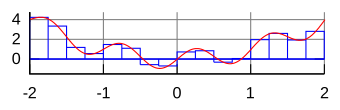
Trapezoidal rule
A little bit more complex is the trapezoidal rule. Each integral in the sum is approximated by the area of a trapezoid. Notice that the trapezoid has two different heights, and to compute its area we have have to evaluate the function at two different values. The area of the trapezoid is then computed by
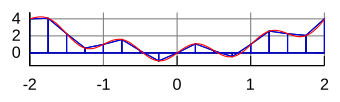
Simpson's rule
The most complicated rule out of the three is the Simpson's rule. The function of each interval is approximated by a polynomial of order 2 and integrating that polynomial instead of the original function. It's error propagation is of order

As you can see, the error for these methods evolve differently for different values of . It's important to keep in mind, that different methods also require different numbers of function calls. So if f(x) is a very expensive function without a lot of fluctuations, it's better to use the rectangle rule, than the trapezoid rule.
There is also a way to vary the size of the intervals depending on the function, but this is a more advanced method. We will just mention it here, for you to know that this exists.
Also keep in mind, that the methods presented here are just the common three out of many which are optimized for different problems.
Exercise 4
Using numpy, program the rectangle and trapezoid rules in the next code block to integrate the function from to . Compare it with the analytic result varying the the number of intervals and see what the difference for the mentioned methods of computation. Plot all your findings
The Simpson's rule is quite complicated to implement and other integration methods can be even more complicated. For that reason, clever people have already done this for us and bundled them in a library. Thescipy library contains many methods for numerical integration. We will now take a look at some of them, but a comprehensive list is here.
scipy.integrate.quad
Scipy's quad function is the main workhorse that you should use for numerical one-dimensional integrals. It is based on the FORTRAN library QUADPACK. Scipy has generally a really good documentation that we encourage you read.
Given a 1-dimensional analytic integrand (or interpolated) function func, the 1-dimensional quad integration has the following syntax:
where args are possible parameters entering in your function. Run the commands import scipy.integrate as integrate and integrate.quad? for additional documentation.
Let us see how to use quad integration with an specific example.
The first number gives you the result, the second one the numerical error of the integration.
While quad is useful for known integrand functions, other methods implemented in the scipy library are useful when having integrand functions that are np.arrays. One of such a methods is the already mentioned trapezoid rule. The syntax for implementation of this integration method is the following:
or
Let us see an specific example of this.
As you can see, the result is fairly similar to the quad method, but you don't have an error estimate.
The last method we will be presenting here, is Simpson's method, which works similar as the trapezoid method. The syntax for the implementation is:
or
Depending on the problem we are trying to solve, we can use either of the different integration methods in scipy library. While quad works just with functions and the step size is estimated on the fly, the implementation of the trapezoid and simpson methods work on arrays.
Keep in mind that one can convert an array into a function and a function into an array, for that, you we have prepared an optional section on interpolating functions, which we will extend in Lecture 7.
Exercise 5
In this exercise we will compute numerically the integral of the function
using the quad integration method described above. Here is a positive real number. For , this integral has an analytic result
which we will use to compare to our numeric integration.
Write a function, which represents the integrand and a function
y(x,a)which calculates the integral. Recall thequadfunction allows for integration when parameters are included inside the integrand, as well as infinite integration interval.Check that your function is well defined by calculating
y(np.inf,10)and compared to the analytic result usinga = 10.Use the interval
x = np.linspace(0, 100, 100)to evaluatey(x,10)Plot your result.
Two-dimensional integrals (scipy.integrate.dblquad)
Higher-dimensional integration is also possible to perform. In particular, for two dimensions we have scipy.integrate.dblquad.
For instance, the area of a circle in Cartesian coordinates can be computed from the double integral.
To understand this further, lets rewrite the integral, to make the variables match with the documentation:
where:
Let's program this integral using our dblquad documentation
And it is as easy as that!
Exercise 4
Using the same approach, calculate the volume of a sphere using the function scipy.integrate.tplquad, which is documented here.
Interpolation (optional)
Given two arrays with data points (y, x), we have precise values where the data points are recorded, but sometimes one wants an estimate of the values in between these data points. A process called interpolation helps us to do this. We will roughly outline interpolation and discuss it in detail in Lecture 7.
Let's say that we have the following data points:

Suppose we want to estimate y(3), but as you can see, a value of y at x=3 doesn't exist. The simplest estimate is a linear interpolation, which means drawing a straight line between the points. This can be done with the scipy.interpolate.interp1d function.
scipy.interpolate.interp1d generates a function in the domain It easily can be understood by plotting it with a high point density, to see that it truly continuous.

There is also the possibility to use a quadratic formula for interpolation, in which case the function and its first derivative are continuous at each point. The keyword kind=2 specifies that we want a polynomial of second order.

A nice little hack to know is, that if you function is bijective, you can calculate the inverse with the inverse interpolation.

There exist also interpolations for 'cubic', 'nearest', etc. depending on the problem you like to solve. Normally you need to experiment a little, to find the one, which fit's the best.