
Book a Demo!
CoCalc Logo Icon
StoreFeaturesDocsShareSupportNewsAboutPoliciesSign UpSign In
mobook
GitHub Repository: mobook/mo-book
Path: blob/main/notebooks/03/10-job-shop-scheduling.ipynb
663 views
Kernel: Python 3 (ipykernel)

Extra material: Job shop scheduling

Preamble: Install Pyomo and a solver

This cell selects and verifies a global SOLVER for the notebook.

If run on Google Colab, the cell installs Pyomo and HiGHS, then sets SOLVER to use the Highs solver via the appsi module. If run elsewhere, it assumes Pyomo and CBC have been previously installed and sets SOLVER to use the CBC solver via the Pyomo SolverFactory. It then verifies that SOLVER is available.

import sys if 'google.colab' in sys.modules: %pip install pyomo >/dev/null 2>/dev/null %pip install highspy >/dev/null 2>/dev/null solver = 'appsi_highs' import pyomo.environ as pyo SOLVER = pyo.SolverFactory(solver) assert SOLVER.available(), f"Solver {solver} is not available."
import matplotlib.pyplot as plt import matplotlib as mpl import pandas as pd

Job Shop Scheduling

Job shop scheduling is one of the classic problems in Operations Research.

A job shop refers to a collection of machines that process jobs. The jobs may be simple or complex, such as the production of a custom part, a print job at printing house, a patient treated in a hospital, or a meal produced in a fast food restaurant. The term "machines" can refer any device, person, or resource involved in the processing the jobs. In what follows in this notebook, a job comprises a series of tasks that requiring use of particular machines for known duration, and which must be completed in specified order.

The job shop scheduling problem is to schedule a set of jobs on the available machines to optimize a metric of productivity. A typical metric is the makespan which refers to the time needed to process all jobs.

At a basic level, the data required to specify a job shop scheduling problem consists of two tables. The first table is a decomposition of the jobs into a series of tasks, each task listing the job name, name of the required machine, and task duration. A second table list task pairs where the first task must be completed before the second task can be started.

Real applications of job shop scheduling often include additional considerations such as time that may be required to set up machines prior to the start of the next job, or limits on the time a job can wait between processing steps.

Job shop example

The following example of a job shop is from Chapter 7 of the book by Christelle Guéret, Christian Prins, Marc Sevaux titled Applications of Optimization with Xpress-MP (Dash Optimization, 2000).

In this example, there are three printed paper products that must pass through color printing presses in a particular order. The given data consists of a flow sheet showing the order in which each job passes through the color presses
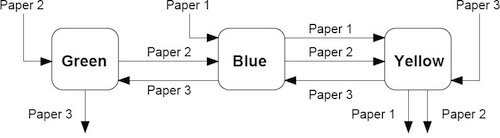
jobshopdiagram.jpg

and a table of data showing, in minutes, the amount of time each job requires on each machine.

MachineColorPaper 1Paper 2Paper 3
1Blue452012
2Green-1017
3Yellow103428

What is the minimum amount of time (i.e, what is the makespan) for this set of jobs?

Task decomposition

The first step in the analysis is to decompose the process into a series of tasks. Each task c(job, machine) pair. Some tasks cannot start until a prerequisite task is completed.

Task (Job,Machine)DurationPrerequisite Task
(Paper 1, Blue)45-
(Paper 1, Yellow)10(Paper 1,Blue)
(Paper 2, Blue)20(Paper 2, Green)
(Paper 2, Green)10-
(Paper 2, Yellow)34(Paper 2, Blue)
(Paper 3, Blue)12(Paper 3, Yellow)
(Paper 3, Green)17(Paper 3, Blue)
(Paper 3, Yellow)28-

We convert this to a JSON style representation where tasks are denoted by (Job,Machine) tuples in Python. The task data is stored in a Python dictionary indexed by (Job,Machine) tuples. The task data consists of a dictionary with duration ('dur') and (Job,Machine) pair for any prerequisite task.

TASKS = { ("Paper_1", "Blue"): {"dur": 45, "prec": None}, ("Paper_1", "Yellow"): {"dur": 10, "prec": ("Paper_1", "Blue")}, ("Paper_2", "Blue"): {"dur": 20, "prec": ("Paper_2", "Green")}, ("Paper_2", "Green"): {"dur": 10, "prec": None}, ("Paper_2", "Yellow"): {"dur": 34, "prec": ("Paper_2", "Blue")}, ("Paper_3", "Blue"): {"dur": 12, "prec": ("Paper_3", "Yellow")}, ("Paper_3", "Green"): {"dur": 17, "prec": ("Paper_3", "Blue")}, ("Paper_3", "Yellow"): {"dur": 28, "prec": None}, }

Model formulation

Each task is indexed by an ordered pair (j,m)(j, m) where jj refers to a job, and mm refers to a machine. Associated with each task is data describing the time needed to perform the task, and a preceding task that must be completed before the index task can start.

ParameterDescription
durj,m\text{dur}_{j,m}Duration of task (j,m)(j,m)
precj,m\text{prec}_{j,m}A task (k,n)=precj,m(k,n) = \text{prec}_{j,m} that must be completed before task (j,m)(j,m)

The choice of decision variables for this problem are key to modeling. We introduce makespanmakespan as the time needed to complete all tasks. makespanmakespan is a candidate objective function. Variable startj,mstart_{j,m} denotes the time when task (j,m)(j,m) begins.

Decision VariablesDescription
makespan\text{makespan}Completion of all jobs
startj,m\text{start}_{j,m}Start time for task (j,m)(j,m)

The constraints include lower bounds on the start and an upper bound on the completion of each task (j,m)(j,m)

startj,m0startj,m+durj,mmakespan\begin{align} \text{start}_{j,m} & \geq 0\\ \text{start}_{j,m}+\text{dur}_{j,m} & \leq \text{makespan} \end{align}

Any preceding tasks must be completed before task (j,m)(j,m) can start.

startk,n+durk,nstartj,m    for (k,n)=precj,m\begin{align} \text{start}_{k,n}+\text{dur}_{k,n}\leq\text{start}_{j,m}\ \ \ \ \text{for } (k,n) =\text{prec}_{j,m} \end{align}

Finally, for every task performed on machine mm, there can be no overlap among those tasks. This leads to a set of pair-wise disjunctive constraints for each machine.

[startj,m+durj,mstartk,m][startk,m+durk,mstartj,m]\begin{align} \left[\text{start}_{j,m}+\text{dur}_{j,m} \leq \text{start}_{k,m}\right] \veebar \left[\text{start}_{k,m}+\text{dur}_{k,m} \leq \text{start}_{j,m}\right] \end{align}

avoids conflicts for use of the same machine.

Pyomo implementation

The job shop scheduling problem is implemented below in Pyomo. The implementation consists of of a function JobShopModel(TASKS) that accepts a dictionary of tasks and returns a Pyomo model.

def jobshop_model(TASKS): model = pyo.ConcreteModel() # tasks is a two dimensional set of (j,m) constructed from the dictionary keys model.TASKS = pyo.Set(initialize=TASKS.keys(), dimen=2) # the set of jobs is constructed from a python set model.JOBS = pyo.Set(initialize=list(set([j for (j, m) in model.TASKS]))) # set of machines is constructed from a python set model.MACHINES = pyo.Set(initialize=list(set([m for (j, m) in model.TASKS]))) # the order of tasks is constructed as a cross-product of tasks and filtering model.TASKORDER = pyo.Set( initialize=model.TASKS * model.TASKS, dimen=4, filter=lambda model, j, m, k, n: (k, n) == TASKS[(j, m)]["prec"], ) # the set of disjunctions is cross-product of jobs, jobs, and machines model.DISJUNCTIONS = pyo.Set( initialize=model.JOBS * model.JOBS * model.MACHINES, dimen=3, filter=lambda model, j, k, m: j < k and (j, m) in model.TASKS and (k, m) in model.TASKS, ) # load duration data into a model parameter for later access @model.Param(model.TASKS) def dur(model, j, m): return TASKS[(j, m)]["dur"] # establish an upper bound on makespan ub = sum([model.dur[j, m] for (j, m) in model.TASKS]) # create decision variables model.makespan = pyo.Var(bounds=(0, ub)) model.start = pyo.Var(model.TASKS, bounds=(0, ub)) @model.Objective(sense=pyo.minimize) def minimize_makespan(model): return model.makespan @model.Constraint(model.TASKS) def finish_tasks(model, j, m): return model.start[j, m] + model.dur[j, m] <= model.makespan @model.Constraint(model.TASKORDER) def preceding(model, j, m, k, n): return model.start[k, n] + model.dur[k, n] <= model.start[j, m] @model.Disjunction(model.DISJUNCTIONS) def no_overlap(model, j, k, m): return [ model.start[j, m] + model.dur[j, m] <= model.start[k, m], model.start[k, m] + model.dur[k, m] <= model.start[j, m], ] pyo.TransformationFactory("gdp.bigm").apply_to(model) return model jobshop_model(TASKS)
<pyomo.core.base.PyomoModel.ConcreteModel at 0x16a3fed40>
def jobshop_solve(model): SOLVER.solve(model) results = [ { "Job": j, "Machine": m, "Start": model.start[j, m](), "Duration": model.dur[j, m], "Finish": model.start[(j, m)]() + model.dur[j, m], } for j, m in model.TASKS ] return results def jobshop(TASKS): return jobshop_solve(jobshop_model(TASKS)) results = jobshop(TASKS) results
[{'Job': 'Paper_1', 'Machine': 'Blue', 'Start': 42.0, 'Duration': 45, 'Finish': 87.0}, {'Job': 'Paper_1', 'Machine': 'Yellow', 'Start': 87.0, 'Duration': 10, 'Finish': 97.0}, {'Job': 'Paper_2', 'Machine': 'Blue', 'Start': 10.0, 'Duration': 20, 'Finish': 30.0}, {'Job': 'Paper_2', 'Machine': 'Green', 'Start': 0.0, 'Duration': 10, 'Finish': 10.0}, {'Job': 'Paper_2', 'Machine': 'Yellow', 'Start': 30.0, 'Duration': 34, 'Finish': 64.0}, {'Job': 'Paper_3', 'Machine': 'Blue', 'Start': 30.0, 'Duration': 12, 'Finish': 42.0}, {'Job': 'Paper_3', 'Machine': 'Green', 'Start': 42.0, 'Duration': 17, 'Finish': 59.0}, {'Job': 'Paper_3', 'Machine': 'Yellow', 'Start': 0.0, 'Duration': 28, 'Finish': 28.0}]

Printing schedules

schedule = pd.DataFrame(results) print("\nSchedule by Job") print(schedule.sort_values(by=["Job", "Start"]).set_index(["Job", "Machine"])) print("\nSchedule by Machine") print(schedule.sort_values(by=["Machine", "Start"]).set_index(["Machine", "Job"]))
Schedule by Job Start Duration Finish Job Machine Paper_1 Blue 42.0 45 87.0 Yellow 87.0 10 97.0 Paper_2 Green 0.0 10 10.0 Blue 10.0 20 30.0 Yellow 30.0 34 64.0 Paper_3 Yellow 0.0 28 28.0 Blue 30.0 12 42.0 Green 42.0 17 59.0 Schedule by Machine Start Duration Finish Machine Job Blue Paper_2 10.0 20 30.0 Paper_3 30.0 12 42.0 Paper_1 42.0 45 87.0 Green Paper_2 0.0 10 10.0 Paper_3 42.0 17 59.0 Yellow Paper_3 0.0 28 28.0 Paper_2 30.0 34 64.0 Paper_1 87.0 10 97.0

Visualizing Results with Gantt Charts

def visualize(results): schedule = pd.DataFrame(results) JOBS = sorted(list(schedule["Job"].unique())) MACHINES = sorted(list(schedule["Machine"].unique())) makespan = schedule["Finish"].max() bar_style = {"alpha": 1.0, "lw": 25, "solid_capstyle": "butt"} text_style = {"color": "white", "weight": "bold", "ha": "center", "va": "center"} colors = mpl.cm.Dark2.colors schedule.sort_values(by=["Job", "Start"]) schedule.set_index(["Job", "Machine"], inplace=True) fig, ax = plt.subplots(2, 1, figsize=(12, 5 + (len(JOBS) + len(MACHINES)) / 4)) for jdx, j in enumerate(JOBS, 1): for mdx, m in enumerate(MACHINES, 1): if (j, m) in schedule.index: xs = schedule.loc[(j, m), "Start"] xf = schedule.loc[(j, m), "Finish"] ax[0].plot([xs, xf], [jdx] * 2, c=colors[mdx % 7], **bar_style) ax[0].text((xs + xf) / 2, jdx, m, **text_style) ax[1].plot([xs, xf], [mdx] * 2, c=colors[jdx % 7], **bar_style) ax[1].text((xs + xf) / 2, mdx, j, **text_style) ax[0].set_title("Job Schedule") ax[0].set_ylabel("Job") ax[1].set_title("Machine Schedule") ax[1].set_ylabel("Machine") for idx, s in enumerate([JOBS, MACHINES]): ax[idx].set_ylim(0.5, len(s) + 0.5) ax[idx].set_yticks(range(1, 1 + len(s))) ax[idx].set_yticklabels(s) ax[idx].text( makespan, ax[idx].get_ylim()[0] - 0.2, "{0:0.1f}".format(makespan), ha="center", va="top", ) ax[idx].plot([makespan] * 2, ax[idx].get_ylim(), "r--") ax[idx].set_xlabel("Time") ax[idx].grid(True) fig.tight_layout() visualize(results)
Image in a Jupyter notebook

Application to the scheduling of batch processes

We will now turn our attention to the application of the job shop scheduling problem to the short term scheduling of batch processes. We illustrate these techniques using Example II from Dunn (2013).
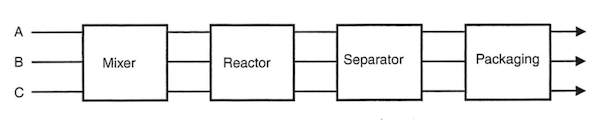
flowshop-Dunn-2013.png

RecipeMixerReactorSeparatorPackaging
A1.05.04.01.5
B--4.51.0
C-3.05.01.5

Single product strategies

Before going further, we create a function to streamline the generation of the TASKS dictionary.

def recipe_to_tasks(jobs, machines, durations): TASKS = {} for j in jobs: prec = (None, None) for m, d in zip(machines, durations): task = (j, m) if prec == (None, None): TASKS.update({(j, m): {"dur": d, "prec": None}}) else: TASKS.update({(j, m): {"dur": d, "prec": prec}}) prec = task return TASKS recipeA = recipe_to_tasks( "A", ["Mixer", "Reactor", "Separator", "Packaging"], [1, 5, 4, 1.5] ) visualize(jobshop(recipeA))
Image in a Jupyter notebook
recipeB = recipe_to_tasks("B", ["Separator", "Packaging"], [4.5, 1]) visualize(jobshop(recipeB))
Image in a Jupyter notebook
recipeC = recipe_to_tasks("C", ["Separator", "Reactor", "Packaging"], [5, 3, 1.5]) visualize(jobshop(recipeC))
Image in a Jupyter notebook

Multiple Overlapping tasks

Let's now consider an optimal scheduling problem where we are wish to make two batches of Product A.

TASKS = recipe_to_tasks( ["A1", "A2", "A3", "A4"], ["Mixer", "Reactor", "Separator", "Packaging"], [1, 5, 4, 1.5], ) results = jobshop(TASKS) visualize(results) print("Makespan =", max([task["Finish"] for task in results]))
Makespan = 26.5
Image in a Jupyter notebook

Earlier we found that it took 11.5 hours to produce one batch of product A. As we see here, we can produce a second batch with only 5.0 additional hours because some of the tasks overlap. The overlapping of tasks is the key to gaining efficiency in batch processing facilities.

Let's next consider production of a single batch each of products A, B, and C.

# update is used to append dictionaries TASKS = recipeA TASKS.update(recipeB) TASKS.update(recipeC) for k, v in TASKS.items(): print(k, v) results = jobshop(TASKS) visualize(results) print("Makespan =", max([task["Finish"] for task in results]))
('A', 'Mixer') {'dur': 1, 'prec': None} ('A', 'Reactor') {'dur': 5, 'prec': ('A', 'Mixer')} ('A', 'Separator') {'dur': 4, 'prec': ('A', 'Reactor')} ('A', 'Packaging') {'dur': 1.5, 'prec': ('A', 'Separator')} ('B', 'Separator') {'dur': 4.5, 'prec': None} ('B', 'Packaging') {'dur': 1, 'prec': ('B', 'Separator')} ('C', 'Separator') {'dur': 5, 'prec': None} ('C', 'Reactor') {'dur': 3, 'prec': ('C', 'Separator')} ('C', 'Packaging') {'dur': 1.5, 'prec': ('C', 'Reactor')} Makespan = 15.0
Image in a Jupyter notebook

The individual production of A, B, and C required 11.5, 5.5, and 9.5 hours, respectively, for a total of 25.5 hours. As we see here, by scheduling the production simultaneously, we can get all three batches done in just 15 hours.

As we see below, each additional set of three products takes an additional 13 hours. So there is considerable efficiency gained by scheduling over longer intervals whenever possible.

TASKS = recipe_to_tasks( ["A1", "A2"], ["Mixer", "Reactor", "Separator", "Packaging"], [1, 5, 4, 1.5] ) TASKS.update(recipe_to_tasks(["B1", "B2"], ["Separator", "Packaging"], [4.5, 1])) TASKS.update( recipe_to_tasks(["C1", "C2"], ["Separator", "Reactor", "Packaging"], [5, 3, 1.5]) ) results = jobshop(TASKS) visualize(results) print("Makespan =", max([task["Finish"] for task in results]))
Makespan = 28.0
Image in a Jupyter notebook

Adding time for unit clean out

A common feature of batch unit operations is a requirement that equipment be cleaned prior to reuse.

In most cases the time needed for clean out would be specific to the equipment and product. But for the purposes this notebook, we implement can implement a simple clean out policy with a single non-negative parameter tclean0t_{clean} \geq 0 which, if specified, requires a period no less than tcleant_{clean} between the finish of one task and the start of another on every piece of equipment.

This policy is implemented by modifying the usual disjunctive constraints to avoid machine conflicts to read

[startj,m+durj,m+tcleanstartk,m][startk,m+durk,m+tcleanstartj,m]\begin{align} \left[\text{start}_{j,m}+\text{dur}_{j,m} + t_{clean} \leq \text{start}_{k,m}\right] \vee \left[\text{start}_{k,m}+\text{dur}_{k,m} + t_{clean} \leq \text{start}_{j,m}\right] \end{align}

For this purpose, we write a new JobShopModel_Clean

def jobshop_model_clean(TASKS, tclean=0): model = pyo.ConcreteModel() # tasks is a two dimensional set of (j,m) constructed from the dictionary keys model.TASKS = pyo.Set(initialize=TASKS.keys(), dimen=2) # the set of jobs is constructed from a python set model.JOBS = pyo.Set(initialize=list(set([j for (j, m) in model.TASKS]))) # set of machines is constructed from a python set model.MACHINES = pyo.Set(initialize=list(set([m for (j, m) in model.TASKS]))) # the order of tasks is constructed as a cross-product of tasks and filtering model.TASKORDER = pyo.Set( initialize=model.TASKS * model.TASKS, dimen=4, filter=lambda model, j, m, k, n: (k, n) == TASKS[(j, m)]["prec"], ) # the set of disjunctions is cross-product of jobs, jobs, and machines model.DISJUNCTIONS = pyo.Set( initialize=model.JOBS * model.JOBS * model.MACHINES, dimen=3, filter=lambda model, j, k, m: j < k and (j, m) in model.TASKS and (k, m) in model.TASKS, ) # load duration data into a model parameter for later access @model.Param(model.TASKS) def dur(model, j, m): return TASKS[(j, m)]["dur"] # establish an upper bound on makespan ub = sum([model.dur[j, m] for (j, m) in model.TASKS]) model.makespan = pyo.Var(bounds=(0, ub)) model.start = pyo.Var(model.TASKS, bounds=(0, ub)) @model.Objective(sense=pyo.minimize) def objective(m): return model.makespan @model.Constraint(model.TASKS) def finish(model, j, m): return model.start[j, m] + model.dur[j, m] <= model.makespan @model.Constraint(model.TASKORDER) def preceding(model, j, m, k, n): return model.start[k, n] + model.dur[k, n] <= model.start[j, m] @model.Disjunction(model.DISJUNCTIONS) def disjunctions(model, j, k, m): return [ model.start[j, m] + model.dur[j, m] + tclean <= model.start[k, m], model.start[k, m] + model.dur[k, m] + tclean <= model.start[j, m], ] pyo.TransformationFactory("gdp.hull").apply_to(model) return model model = jobshop_model_clean(TASKS, tclean=0.5) results = jobshop_solve(model) visualize(results) print("Makespan =", max([task["Finish"] for task in results]))
Makespan = 30.5
Image in a Jupyter notebook

Adding a zero wait policy

One of the issues in the use of job shop scheduling for chemical process operations are situations where there it is not possible to store intermediate materials. If there is no way to store intermediates, either in the processing equipment or in external vessels, then a zero-wait policy may be required.

A zero-wait policy requires subsequent processing machines to be available immediately upon completion of any task. To implement this policy, the usual precident sequencing constraint of a job shop scheduling problem, i.e.,

startk,n+Durk,nstartj,m    for (k,n)=Precj,m\begin{align*} \text{start}_{k,n}+\text{Dur}_{k,n} \leq \text{start}_{j,m}\ \ \ \ \text{for } (k,n) =\text{Prec}_{j,m} \end{align*}

is changed to

startk,n+Durk,n=startj,m    for (k,n)=Precj,m and ZW is True\begin{align*} \text{start}_{k,n}+\text{Dur}_{k,n} = \text{start}_{j,m}\ \ \ \ \text{for } (k,n) =\text{Prec}_{j,m}\text{ and ZW is True} \end{align*}

if the zero-wait policy is in effect.

While this could be implemented on an equipment or product specific basis, here we add an optional ZW flag to the JobShop function that, by default, is set to False.

def jobshop_model_clean_zw(TASKS, tclean=0, ZW=False): model = pyo.ConcreteModel() # tasks is a two dimensional set of (j,m) constructed from the dictionary keys model.TASKS = pyo.Set(initialize=TASKS.keys(), dimen=2) # the set of jobs is constructed from a python set model.JOBS = pyo.Set(initialize=list(set([j for (j, m) in model.TASKS]))) # set of machines is constructed from a python set model.MACHINES = pyo.Set(initialize=list(set([m for (j, m) in model.TASKS]))) # the order of tasks is constructed as a cross-product of tasks and filtering model.TASKORDER = pyo.Set( initialize=model.TASKS * model.TASKS, dimen=4, filter=lambda model, j, m, k, n: (k, n) == TASKS[(j, m)]["prec"], ) # the set of disjunctions is cross-product of jobs, jobs, and machines model.DISJUNCTIONS = pyo.Set( initialize=model.JOBS * model.JOBS * model.MACHINES, dimen=3, filter=lambda model, j, k, m: j < k and (j, m) in model.TASKS and (k, m) in model.TASKS, ) # load duration data into a model parameter for later access @model.Param(model.TASKS) def dur(model, j, m): return TASKS[(j, m)]["dur"] # establish an upper bound on makespan ub = sum([model.dur[j, m] for (j, m) in model.TASKS]) model.makespan = pyo.Var(bounds=(0, ub)) model.start = pyo.Var(model.TASKS, bounds=(0, ub)) @model.Objective(sense=pyo.minimize) def objective(model): return model.makespan @model.Constraint(model.TASKS) def finish(mode, j, m): return model.start[j, m] + model.dur[j, m] <= model.makespan @model.Constraint(model.TASKORDER) def preceding(model, j, m, k, n): if ZW: return model.start[k, n] + model.dur[k, n] == model.start[j, m] else: return model.start[k, n] + model.dur[k, n] <= model.start[j, m] @model.Disjunction(model.DISJUNCTIONS) def disjunctions(model, j, k, m): return [ model.start[j, m] + model.dur[j, m] + tclean <= model.start[k, m], model.start[k, m] + model.dur[k, m] + tclean <= model.start[j, m], ] pyo.TransformationFactory("gdp.hull").apply_to(model) return model model = jobshop_model_clean_zw(TASKS, tclean=0.5, ZW=True) results = jobshop_solve(model) visualize(results) print("Makespan =", max([task["Finish"] for task in results]))
Makespan = 32.0
Image in a Jupyter notebook

References

Exercises

Task specific cleanout

Clean out operations are often slow and time consuming. Further more, the time required to perform a clean out frequently depends on the type of machine, and the task performed by the machine. For this exercise, create a data format to include task-specific clean out times, and model the job shop model to accommodate this additional information.

Computational impact of a zero-wait policy

Repeat the benchmark problem calculation, but with a zero-wait policy. Does the execution time increase or descrease as a consequence of specifying zero-wait?