Book a Demo!
CoCalc Logo Icon
StoreFeaturesDocsShareSupportNewsAboutPoliciesSign UpSign In
polakowo
GitHub Repository: polakowo/vectorbt
Path: blob/master/README.md
1068 views

Usage

vectorbt allows you to easily backtest strategies with a couple of lines of Python code.

  • Here is how much profit we would have made if we invested $100 into Bitcoin in 2014:

import vectorbt as vbt price = vbt.YFData.download('BTC-USD').get('Close') pf = vbt.Portfolio.from_holding(price, init_cash=100) pf.total_profit()
8961.008555963961
  • Buy whenever 10-day SMA crosses above 50-day SMA and sell when opposite:

fast_ma = vbt.MA.run(price, 10) slow_ma = vbt.MA.run(price, 50) entries = fast_ma.ma_crossed_above(slow_ma) exits = fast_ma.ma_crossed_below(slow_ma) pf = vbt.Portfolio.from_signals(price, entries, exits, init_cash=100) pf.total_profit()
16423.251963801864
  • Generate 1,000 strategies with random signals and test them on BTC and ETH:
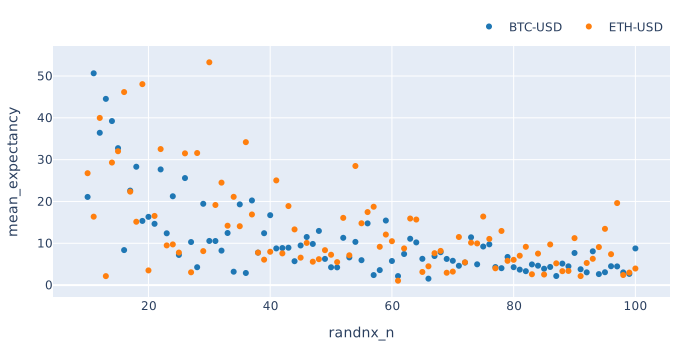
import numpy as np symbols = ["BTC-USD", "ETH-USD"] price = vbt.YFData.download(symbols, missing_index='drop').get('Close') n = np.random.randint(10, 101, size=1000).tolist() pf = vbt.Portfolio.from_random_signals(price, n=n, init_cash=100, seed=42) mean_expectancy = pf.trades.expectancy().groupby(['randnx_n', 'symbol']).mean() fig = mean_expectancy.unstack().vbt.scatterplot(xaxis_title='randnx_n', yaxis_title='mean_expectancy') fig.show()

rand_scatter.svg

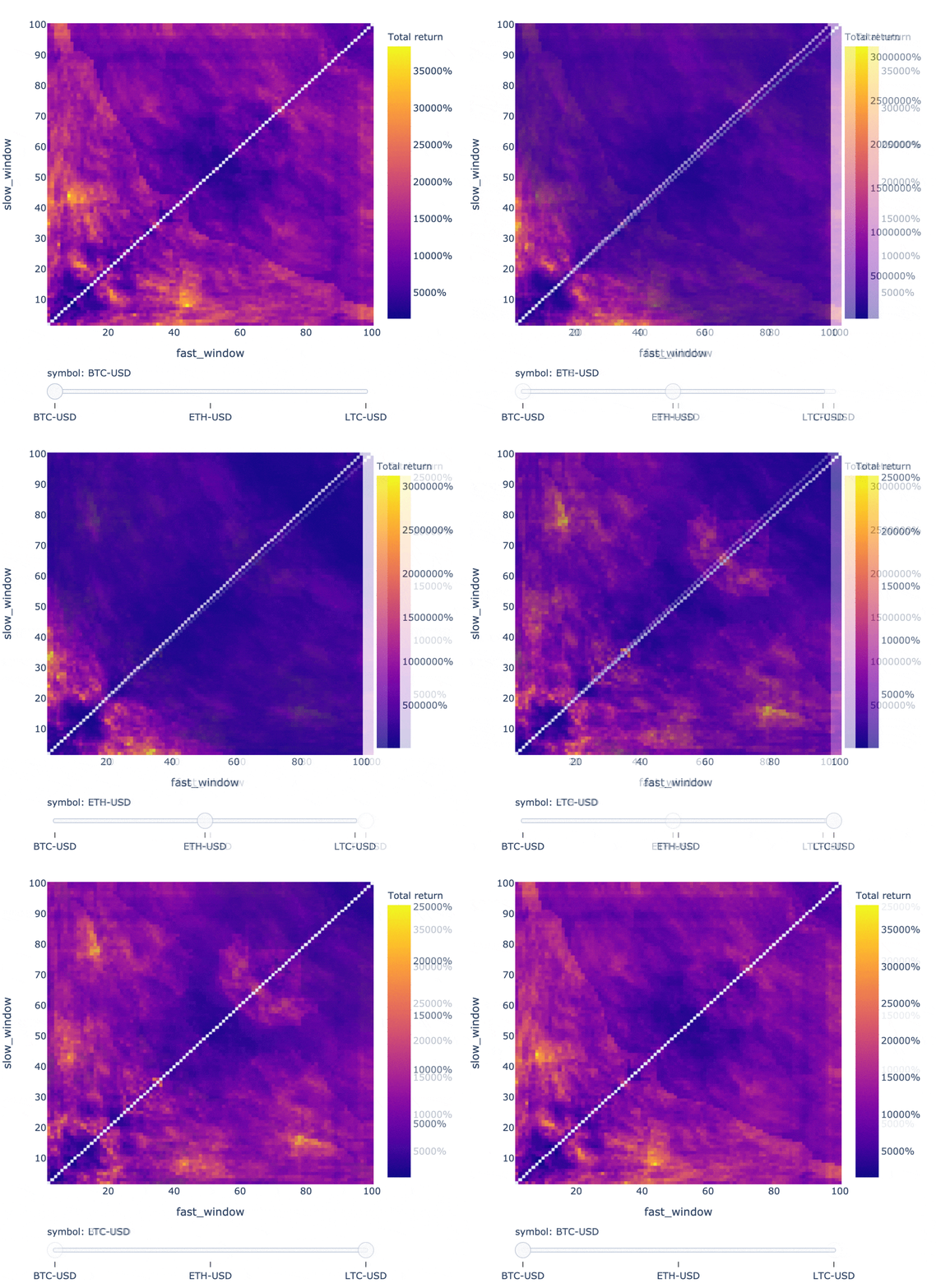
  • For fans of hyperparameter optimization: here is a snippet for testing 10,000 window combinations of a dual SMA crossover strategy on BTC, USD, and LTC:

symbols = ["BTC-USD", "ETH-USD", "LTC-USD"] price = vbt.YFData.download(symbols, missing_index='drop').get('Close') windows = np.arange(2, 101) fast_ma, slow_ma = vbt.MA.run_combs(price, window=windows, r=2, short_names=['fast', 'slow']) entries = fast_ma.ma_crossed_above(slow_ma) exits = fast_ma.ma_crossed_below(slow_ma) pf_kwargs = dict(size=np.inf, fees=0.001, freq='1D') pf = vbt.Portfolio.from_signals(price, entries, exits, **pf_kwargs) fig = pf.total_return().vbt.heatmap( x_level='fast_window', y_level='slow_window', slider_level='symbol', symmetric=True, trace_kwargs=dict(colorbar=dict(title='Total return', tickformat='%'))) fig.show()

Digging into each strategy configuration is as simple as indexing with pandas:

pf[(10, 20, 'ETH-USD')].stats()
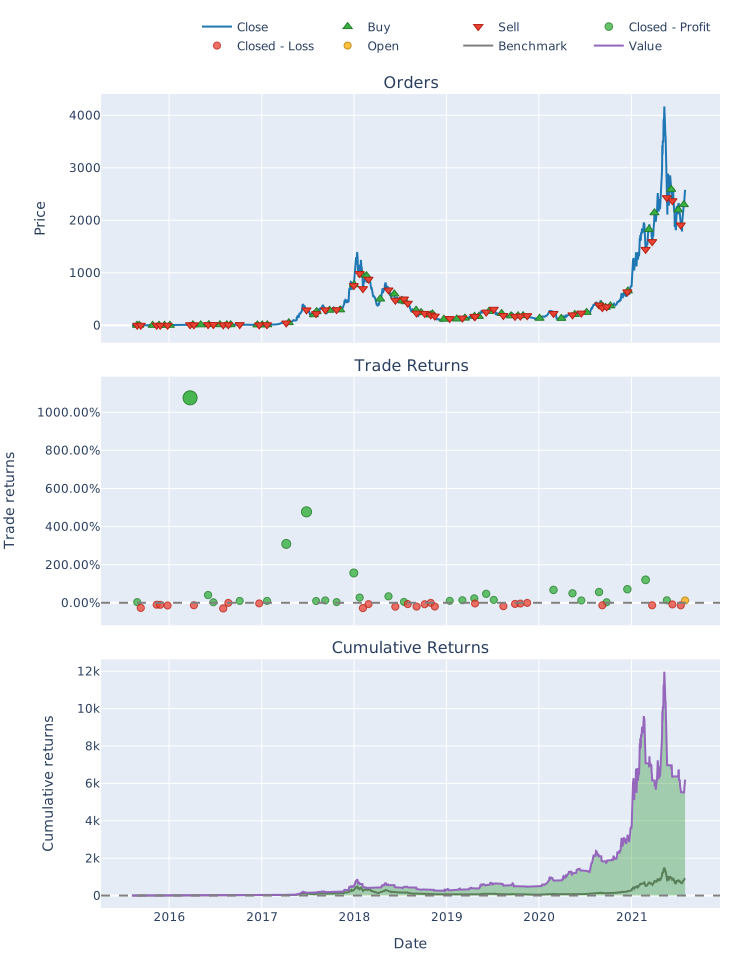
Start 2015-08-07 00:00:00+00:00 End 2021-08-01 00:00:00+00:00 Period 2183 days 00:00:00 Start Value 100.0 End Value 620402.791485 Total Return [%] 620302.791485 Benchmark Return [%] 92987.961948 Max Gross Exposure [%] 100.0 Total Fees Paid 10991.676981 Max Drawdown [%] 70.734951 Max Drawdown Duration 760 days 00:00:00 Total Trades 54 Total Closed Trades 53 Total Open Trades 1 Open Trade PnL 67287.940601 Win Rate [%] 52.830189 Best Trade [%] 1075.803607 Worst Trade [%] -29.593414 Avg Winning Trade [%] 95.695343 Avg Losing Trade [%] -11.890246 Avg Winning Trade Duration 35 days 23:08:34.285714286 Avg Losing Trade Duration 8 days 00:00:00 Profit Factor 2.651143 Expectancy 10434.24247 Sharpe Ratio 2.041211 Calmar Ratio 4.6747 Omega Ratio 1.547013 Sortino Ratio 3.519894 Name: (10, 20, ETH-USD), dtype: object

The same for plotting:

pf[(10, 20, 'ETH-USD')].plot().show()

dmac_portfolio.svg

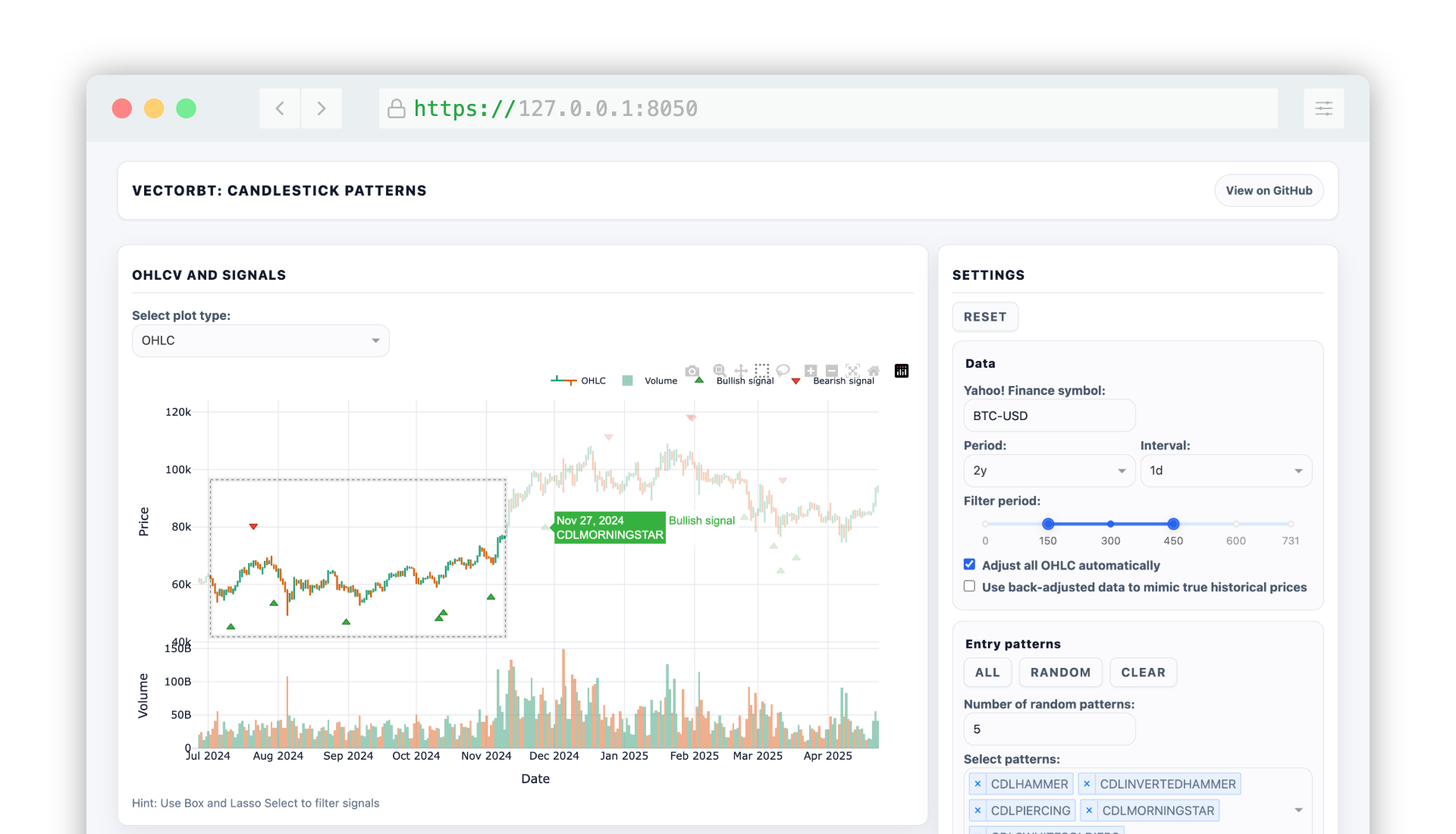
It's not all about backtesting - vectorbt can be used to facilitate financial data analysis and visualization.

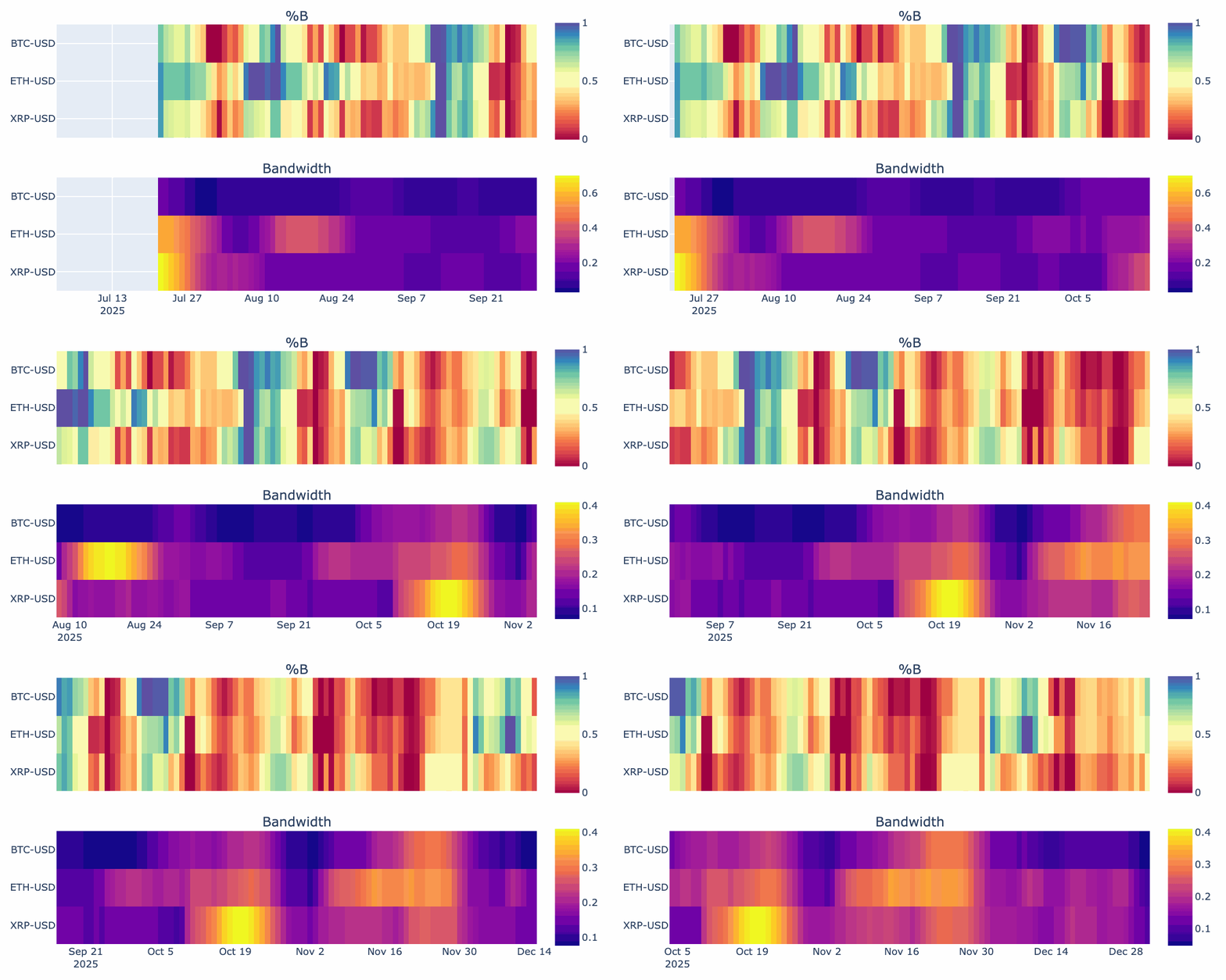
  • Let's generate a GIF that animates the %B and bandwidth of Bollinger Bands for different symbols:

symbols = ["BTC-USD", "ETH-USD", "ADA-USD"] price = vbt.YFData.download(symbols, period='6mo', missing_index='drop').get('Close') bbands = vbt.BBANDS.run(price) def plot(index, bbands): bbands = bbands.loc[index] fig = vbt.make_subplots( rows=2, cols=1, shared_xaxes=True, vertical_spacing=0.15, subplot_titles=('%B', 'Bandwidth')) fig.update_layout(template='vbt_dark', showlegend=False, width=750, height=400) bbands.percent_b.vbt.ts_heatmap( trace_kwargs=dict(zmin=0, zmid=0.5, zmax=1, colorscale='Spectral', colorbar=dict( y=(fig.layout.yaxis.domain[0] + fig.layout.yaxis.domain[1]) / 2, len=0.5 )), add_trace_kwargs=dict(row=1, col=1), fig=fig) bbands.bandwidth.vbt.ts_heatmap( trace_kwargs=dict(colorbar=dict( y=(fig.layout.yaxis2.domain[0] + fig.layout.yaxis2.domain[1]) / 2, len=0.5 )), add_trace_kwargs=dict(row=2, col=1), fig=fig) return fig vbt.save_animation('bbands.gif', bbands.wrapper.index, plot, bbands, delta=90, step=3, fps=3)
100%|██████████| 31/31 [00:21<00:00, 1.21it/s]

And this is just the tip of the iceberg of what's possible. Check out the website to learn more.

Installation

pip install -U vectorbt

To also install optional dependencies:

pip install -U "vectorbt[full]"

Colab Notebook

Google Colaboratory

License

This work is fair-code distributed under Apache 2.0 with Commons Clause license. The source code is open and everyone (individuals and organizations) can use it for free. However, it is not allowed to sell products and services that are mostly just this software.

If you have any questions about this or want to apply for a license exception, please contact the author.

Installing optional dependencies may be subject to a more restrictive license.

Star History

Star History Chart

Disclaimer

This software is for educational purposes only. Do not risk money which you are afraid to lose. USE THE SOFTWARE AT YOUR OWN RISK. THE AUTHORS AND ALL AFFILIATES ASSUME NO RESPONSIBILITY FOR YOUR TRADING RESULTS.