
print "Template - 2D Plots rev 2015 Feb 07 "
#
#         This worksheet covers the 2D plot functions and the function show().
#         It is not a tutorial, just a reminder and examples of how the functions work.
#         It has example code for 2D Plots, copy cells and edit for your own use.
#         You can also modify code in place and see the effect.  Most cells do not depend on prior cells for correct evaluation
#         A text search of the page can be useful to find a topic you seek.
#         Some coverage for:
#            Basic 2D plot -- plot
#            Plot using the ticks ( tickmarks on the axis )
#            Plot using Python functions defined using 'def:
#            Scatter plot and line
#            Parametric Plot
#            Polar Plot
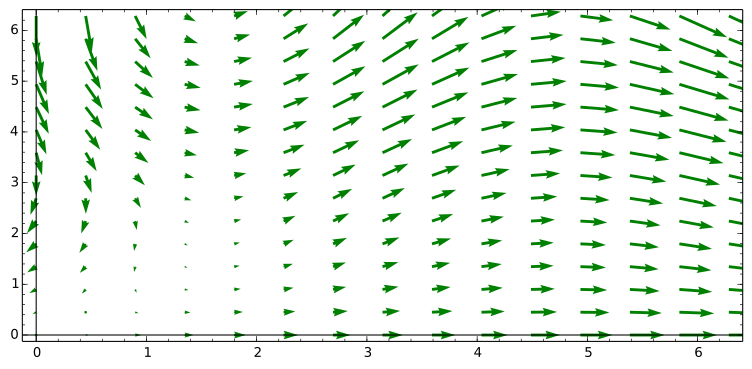
#            Plot Slopes Field
#            Plot a vector field
#            Simple plot elements like
#                points, lines, arrows.....
#
#            Missing ( contributions anyone ):
#                log, log/log ...... graphs
#
#     Built and tested on Sage Cloud
#     Status ready for initial release, send comments to author, see below
#     Level
#           Math      - Calculus first course
#           SageMath  - beginner
#
#     Possibly useful references ( Some are more advanced than the material in this worksheet )
#
#          Sage Reference v4.8 » 2D Graphics » 2D Plotting http://www.sagemath.org/doc/reference/sage/plot/plot.html
#           http://www.sagemath.org/pdf/en/reference/plotting/plotting.pdf
#
#          Sage Tutorial v4.8 » A Guided Tour » Plotting  http://www.sagemath.org/doc/tutorial/tour_plotting.html
#          http://www.packtpub.com/article/plotting-data-sage
#
#     Authors:   [email protected]  ( contact for comments, additions, or problems )
#                often using examples found in other's worksheets
print "end title comments"
Template - 2D Plots rev 2015 Feb 07
end title comments
print "*2D plot: Basic almost as simple as you can go  -- uses plot() and show()"
#
# You can go simpler by packing more stuff on a line, but that is not a flexible for revision.
#note: that to see the plots you need to use show( <a plot> )

var( "x" )   # define x as a variable ( x is automagically a variable because of its special name so this is not really required )

f1 = sin( x ) * sin( x )  # define f1 as an expression ( this is not a formula, nor is f1 )


pt    =        plot( f1, x, -pi, +pi ,)   # creates the plot in memory someplace, but you cannot see it until show()

show( pt )   # with only default options
2D plot: Basic almost as simple as you can go -- uses plot() and show()
x

︠c6f7924f-41d1-4d2d-9fef-9ce1efe94dbd︠
print "*2D plot: Basic with 2 lines and style options  -- plot() and show()"
#
# not an example of a great or even good looking plot but uses lots of features
# we have included lots of options on the second plot some options on show()
# we have defined the two functions outside the plot, as well as the upper and lower limits
# this frequently makes plots more flexible
#

var( "x" )

f1 = sin( x ) * sin( x )
f2 = ( 1/ 10000 ) * exp( x ^ 2 )

ll  = -1. * pi    # lower limit of graph
ul  =  1. * pi    # upper limit of graph

# quick rgbcolor= "blue" "black" "red" "orange" ....   also hue( x ) with x in range of .1 to .9 seems to work
# print "Use these for colors: ", sorted(colors) # this line will print even more colors
# linestyle = "-"

pt    =        plot( f1, x, ll, ul, rgbcolor="red",  linestyle = "-",  fill=False, thickness=1 , legend_label ="a legend label" )
pt    = pt   + plot( f2, x, ll, ul, rgbcolor="blue", linestyle = "--", fill=True,  thickness=1 )   # you can add plots together for multilined plots

# some options
# thickness=t, color='purple', fill=True, gridlines=grid
# frame=True,
# gridlines="minor" "major" false true
# axes = True False
# aspect_ratio= a number or 'automatic'
# figsize=  4 is default bigger is bigger.....  or [ horizontal vert ]  ex: [4,8]


show( pt,  aspect_ratio = 1, axes=true, frame=True,  gridlines=false, figsize=6,  xmin=-4, xmax=4,  ymin=-4, ymax=4 )   # with options
2D plot: Basic with 2 lines and style options -- plot() and show()
x

print "*A plot using the ticks ( tickmarks on the axis )"
# also with optional way of expressing the expression to be graphed and its limits

aplot = plot( x^2, (x, 0,50), ticks=[10,500], figsize=[6,2] )   # ticks=[10,500] space horz ticks 10 apart and vertical 500 apart
show( aplot )
A plot using the ticks ( tickmarks on the axis )

print "*Ticks at will with laytex formatting"

fx = 1 * (x^2)+1

show( plot( fx ,(x,0,5),ticks=[[0,1,e,pi,sqrt(20)], 5 ], tick_formatter="latex"), figsize=[5,5], ) # laytex only on horz axis
Ticks at will with laytex formatting

print "*Plotting using Python functions defined using 'def:'"   # see  http://www.sagemath.org/doc/tutorial/tour_functions.html

def f(z):     # this and next line define a Python function
    return z^2

print "type(f)", type(f)  # show what kind of thing Sage thinks f

print "show f(3) = ", f(3)  # show a value of the function

print "Define plot and show it in one line"
show( plot(f, 0, 2), figsize=[6,2] )

# In the last line, note the syntax. Using plot( f(z), 0, 2) instead will give an error, because z is a dummy
#  variable in the definition of f and is not defined outside of that definition.
#  Indeed, just f(z) returns an error.

# here is another way that works
print "Define plot and show it in one line alternate syntax "
var( "z" )
show( plot(f(z),z, 0, 2), figsize=[6,2], )
Plotting using Python functions defined using 'def:'
type(f) <type 'function'>
show f(3) = 9
Define plot and show it in one line

Define plot and show it in one line alternate syntax
z

print "Scatter plot and line"   # http://www.packtpub.com/article/plotting-data-sage

# python function
def noisy_line(m, b, x):
    ret  = m * x + b + 0.5 * (random() - 0.5)
    return ret

slope     = 1.0
intercept = -0.5

x_coords = [random() for t in range(50)]
y_coords = [noisy_line(slope, intercept, x) for x in x_coords]

sp = scatter_plot(zip(x_coords, y_coords))

sp += line([(0.0, intercept), (1.0, slope+intercept)], color='red')

sp.show( figsize=[6,2])
Scatter plot and line

print "Parametric Plot"
# for graphing parametric equations ( 2 functions with a common variable implying a relation between the 2 functions )
# here we do 3 plots in one using the parameter t

var( "t" )  # our parameter

ll  = -1. * pi    # lower limit of graph
ul  =  1. * pi    # upper limit of graph

# parametric_plot( x axis function, y axis function ) , ( parametric variable, min value, max value ), other plot args )

p1 = parametric_plot((cos(t),sin(t)),   (t, ll, ul),    rgbcolor=hue(0.2))
p2 = parametric_plot((cos(t),sin(t)^4), (t, ll,ul),     rgbcolor=hue(0.4))
p3 = parametric_plot((cos(t),sin(t)^8), (t, ll, ul),    rgbcolor=hue(0.6))

show( p1+p2+p3, axes=false )
#
Parametric Plot
t

print "Polar Plot"

# Plot using polar coordinates
# note that many of the options for plot() also work here.

var( "theta" )

f =  1-2*sin(2*theta); show( f )

pp = polar_plot( f, theta, 0, 2*pi )
show( pp )
Polar Plot
theta
−2sin(2θ)+1

print "Plot Slopes Field"

# make some variables
var( "x" )
var( "y" )    # this will be our function

# define the slope to be the value of the function
slope  =  y ^ 2

# make the plot in pt
pt  = plot_slope_field( slope, ( x, -1, 1 ), ( y, .001, 10 ) )  # plot_slope_field(f, (xvar, xmin, xmax), (yvar, ymin, ymax))

# note that someplace in the evaluation of this we get divide by zero errors - does not seem to hurt the graph

show( pt, aspect_ratio='automatic' )     # I like this the best aspect_ratio the best options are no option, =1 ='automatic'
Plot Slopes Field
x
y

print "Plot a vector field"

var( "x" )
var( "y" )

A =  x - sin(y)
B = -y * cos(x)

field = (A,B)

density_vectors = 15  # higher numbers plot more vectors

H = plot_vector_field( field, (x,0,2*pi), (y,0,2*pi), plot_points=density_vectors, color='green' )
show( H )
Plot a vector field
x
y
︠d5ae737b-1c67-4e5e-b309-079ef0b3b454︠
print "Next simple graphic elements"
Next simple graphic elements
print "Plot of a list of points"  #

# either type of list works
dictionary_list =  {22: 3365, 27: 3295, 37: 3135, 42: 3020, 47: 2880, 52: 2735, 57: 2550}
tuple_list      =  [ ( 22, 3365) , ( 27, 3295 ), ( 37, 3135 ), ( 42, 3020 ), ( 47, 2880 ), ( 52, 2735 ), (57, 2550 ) ]


listPlot  = list_plot( dictionary_list )

show( listPlot, figsize=[6,2] )
Plot of a list of points

print "Plotting points as points"

points = point( [1, 1] ) + point( [2, 1] )
plot1  = plot( points )
show( plot1, figsize=4  )


fancyPoints = point((0.5, 0.5), rgbcolor=(1, 0, 0), size=30)
fancyPoints = fancyPoints + point((0.7, 0.7), rgbcolor=(0, 1, 0), size=50)

show( fancyPoints , figsize=4   )
Plotting points as points


print "Line with dot at end"

# fancy way to compute in polar form

r        =  5

t        = pi/4.
x        = r*cos( t )
y        = r*sin( t )
aPoint   = point( ( x, y ), rgbcolor="red", size=30 )
aLine    = line([(0.,0.), ( x, y ) ]  , rgbcolor="blue" , linestyle = "dashed"  )

plot  = aPoint + aLine
show( plot,  xmin=-1.2, xmax=5.2,  ymin=-1.2, ymax=5.2 , figsize=[3,3] )
Line with dot at end

︠402f6832-475d-4c40-ab42-8dfad4b373b8s︠
print "Plot a Circle"

anGraphic = circle((0,0), .5, rgbcolor=(1,0,0),  fill=False )    # fill controls filling of circle with color

show( anGraphic, aspect_ratio=1, figsize = 4 ,xmax = 1, ymax = 1)
Plot a Circle

print "Plot an Arc"

graphic   = ( arc((0,0), 1, sector=(0,  1*pi /4) ) )

show( graphic , xmin=-1.2, xmax=1.2,  ymin=-1.2, ymax=1.2, figsize=[3,3] )
Plot an Arc

print "Plot an Arrow"


anGraphic = arrow((0,1), (2,3) ) # start cord, end cord as tuples

show( anGraphic,  figsize = 2  )
Plot an Arrow

print "Plot Text"

aGraphic     = text("Sample Text", (5,4), rgbcolor=(1,0,0))  # text is followed by tuple for position
show( aGraphic, aspect_ratio=1, figsize = 3 )
Plot Text

that is all for now send suggestions to [email protected]