

Book a Demo!
CoCalc Logo Icon
StoreFeaturesDocsShareSupportNewsAboutPoliciesSign UpSign In
Download

Jupyter notebook basic-cython.ipynb

255 views
Kernel: Python 2

Basic Cython


Robert Bradshaw, Google, Inc.
NCCU PyDay
8 June, 2015

Getting Started

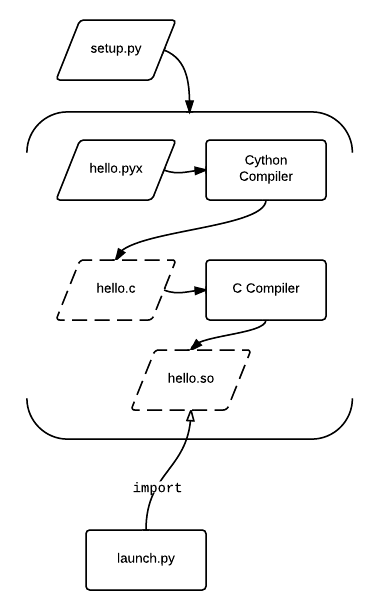
First you'll need to install Cython. This is typically as easy as running pip install cython. You'll also need Python of course, with header files, and a C compiler. For more details, see http://docs.cython.org/src/quickstart/install.html. You then compile your code by writing a setup.py file.

Alternatively, you can try Cython out online via the http://cloud.sagemath.org.

%load_ext cython

My first Cython program

%%cython print "你好"
你好

##What is Cython?

  • Cython is an optimizing Python-to-C compiler

    • Cython code is turned into C code which is compiled and loaded into a running Python session

    • You can easily call Python code from Cython and Cython code from Python

  • Cython is an extenstion of the Python language

    • Extra syntax for declaring types and other constructs

  • Cython is the easiest way to write Python C extensions

    • No need to learn, or port to, new language

    • No dealing with ref counting, argument parsing, type conversion, exception handling...
Why Cython

  • Optimize only what you need

    • Most time is spent in a small portion of your code

  • Easy migration

    • Of both code and developers

    • Piece by piece as needed

  • Focus on the algorithm

    • ...not the boring, tedious, and error-prone boilerplate code

    • Leverage everything from the Python ecosystem
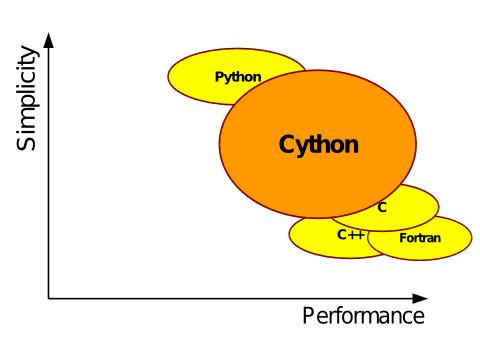
What makes Python slow

  • It's interpreted

  • Cython is compiled

  • Everything is an object

  • Cython has primitive cdef types

  • Complicated calling conventions

  • Cython has cdef functions

  • Dictionary lookups

  • Cython has cdef attributes

Let's see these used in practice. First, define a simple integral in Python.

def f(x): return x*x def integrate(a, b, N=100000): s = 0 dx = (b-a) / N for k in range(N): s += f(a+k*dx) s += (f(b) - f(a)) / 2 return s * dx
integrate(0.0, 1.0)
0.3333333333499996
%timeit integrate(0.0, 1.0)
10 loops, best of 3: 21.3 ms per loop

Now compile this same exact code with Cython.

%%cython -a def f(x): return x*x def integrate(a, b, N=100000): s = 0 dx = (b-a) / N for k in range(N): s += f(a+k*dx) s += (f(b) - f(a)) / 2 return s * dx
%timeit integrate(0.0, 1.0)
100 loops, best of 3: 9.41 ms per loop

A 2x speedup. Not bad, but we can do much better. We can declare function arguments and local variables as C types using the cdef keyword.

%%cython -a def f(double x): return x*x def integrate(double a, double b, long N=100000): cdef long k cdef double s = 0 dx = (b-a) / N for k in range(N): s += f(a+k*dx) s += (f(b) - f(a)) / 2 return s * dx
%timeit integrate(0.0, 1.0)
100 loops, best of 3: 5.13 ms per loop

A significant source of overhead is Python function calls. Let's make f into a cdef function.

%%cython -a cdef double f(double x): return x*x def integrate(double a, double b, long N=100000): cdef long k cdef double s = 0 dx = (b-a) / N for k in range(N): s += f(a+k*dx) s += (f(b) - f(a)) / 2 return s * dx
%timeit integrate(0.0, 1.0)
10000 loops, best of 3: 115 µs per loop
21e-3 / 115e-6
182.6086956521739

Of course we don't want to be stuck with a single function, let's make a class that allows you to customize this function.

%%cython cdef class Function: cpdef double call(self, double x): raise NotImplementedError cdef class MyFunction(Function): cpdef double call(self, double x): return x*x cdef class MyOtherFunction(Function): cpdef double call(self, double x): return 1 - x*x def integrate(Function f, double a, double b, long N=100000): cdef long k cdef double s = 0 dx = (b-a) / N for k in range(N): s += f.call(a+k*dx) s += (f.call(b) - f.call(a)) / 2 return s * dx
%timeit integrate(MyFunction(), 0.0, 1.0)
1000 loops, best of 3: 340 µs per loop
integrate(MyFunction(), 0.0, 1.0)
0.3333333333499996
integrate(MyOtherFunction(), 0.0, 1.0)
0.6666666666499982

Cython is also often used to call external libraries using the extern keyword.

%%cython cdef extern from "math.h": double sin(double) cdef class Function: cpdef double call(self, double x): raise NotImplementedError cdef class YetAnotherFunction(Function): cpdef double call(self, double x): return sin(x*x) def integrate(Function f, double a, double b, long N=100000): cdef long k cdef double s = 0 dx = (b-a) / N for k in range(N): s += f.call(a+k*dx) s += (f.call(b) - f.call(a)) / 2 return s * dx
integrate(YetAnotherFunction(), 0.0, 1.0)
0.310268301732385

One can also cimport functions and classes from other Cython files, both built-in and from other packages.

%%cython from libc.math cimport sin

Working with NumPy

As Cython is often used in a numerical/scientific computing context, it has extensive support for working with Numpy arrays. There are two interfaces: the buffer syntax and the memory view syntax. Below is just a the basic sample, for more see http://docs.cython.org/src/tutorial/numpy.html and http://docs.cython.org/src/userguide/memoryviews.html

%%cython -a cimport numpy as np import math def numpy_norm(np.ndarray[double] x): cdef double s = 0 for k in range(x.shape[0]): s += x[k]*x[k] return s def memview_norm(double[:] x): cdef double s = 0 for k in range(x.shape[0]): s += x[k]*x[k] return s
import numpy as np x = np.arange(1000000, dtype=float) print x print np.dot(x, x), numpy_norm(x), memview_norm(x)
[ 0.00000000e+00 1.00000000e+00 2.00000000e+00 ..., 9.99997000e+05 9.99998000e+05 9.99999000e+05] 3.33332833333e+17 3.33332833333e+17 3.33332833333e+17


Generally, when shipping a project using Cython, one puts Cython modules in .pyx files along side .py files and uses a setup.py file:

from distutils.core import setup from Cython.Build import cythonize setup( name = "My App", ext_modules = cythonize('*.pyx'), # accepts a glob pattern )

You can also use decorators to compile things "just in time."

!rm -r /projects/d572c32f-0b22-4b4f-8a67-fcbd8e10a9f6/.cython/inline/
import cython a = 3 cython.inline("return b * a", b = 4)
Compiling /projects/d572c32f-0b22-4b4f-8a67-fcbd8e10a9f6/.cython/inline/_cython_inline_f07277b1679e9dc372391ed26352391c.pyx because it changed. Cythonizing /projects/d572c32f-0b22-4b4f-8a67-fcbd8e10a9f6/.cython/inline/_cython_inline_f07277b1679e9dc372391ed26352391c.pyx
warning: .cython/inline/_cython_inline_f07277b1679e9dc372391ed26352391c.pyx:6:4: Unreachable code
12

Compiled code is cached for re-use.

import cython a = 3 cython.inline("return b * a", b = 4)
12

We can also use the cython.compile decorator.

@cython.compile def f(a, b): return a + b
f(1, 2)
Compiling /projects/d572c32f-0b22-4b4f-8a67-fcbd8e10a9f6/.cython/inline/_cython_inline_8d6d7d3926c6bc6cbbf3c9fa3c8847c2.pyx because it changed. Cythonizing /projects/d572c32f-0b22-4b4f-8a67-fcbd8e10a9f6/.cython/inline/_cython_inline_8d6d7d3926c6bc6cbbf3c9fa3c8847c2.pyx
warning: .cython/inline/_cython_inline_8d6d7d3926c6bc6cbbf3c9fa3c8847c2.pyx:8:4: Unreachable code
3

These caches are specialized and cached per type.

f(1.0, 2.0)
Compiling /projects/d572c32f-0b22-4b4f-8a67-fcbd8e10a9f6/.cython/inline/_cython_inline_6627900c3125e1c7ae1327a85ff0327e.pyx because it changed. Cythonizing /projects/d572c32f-0b22-4b4f-8a67-fcbd8e10a9f6/.cython/inline/_cython_inline_6627900c3125e1c7ae1327a85ff0327e.pyx
warning: .cython/inline/_cython_inline_6627900c3125e1c7ae1327a85ff0327e.pyx:8:4: Unreachable code
3.0

Compiled code is cached for re-use.

f(1, 2.5)
3.5