
# Lab 5

# Name: Sarah Ahmed
# I worked on this code with:

# Please do all of your work for this week's lab in this worksheet. If
# you wish to create other worksheets for scratch work, you can, but
# this is the one that will be graded. You do not need to do anything
# to turn in your lab. It will be collected by your TA at the beginning
# of (or right before) next week’s lab.

# Be sure to put each exercise in a new cell with an exercise number at the top.
# Use enough comments that you and the grader can understand your code.
# Label axes on all graphs.
#I changed the title to lab 5 because before it said lab 1!
#Lab 5: do #1-18
#1
v1=vector([3,10]) #create vector using matrix with values 3 and 10
v1 #show vector
(3, 10)
#2
v=vector([-2, 7, 5]) #create vector with three-value matrix
type(v) #show what type of sage item the above vector is
<type 'sage.modules.vector_integer_dense.Vector_integer_dense'>
#3
a=vector([4,2]) #define a as vector of matrix [4,2]
b=vector([-1,5]) #define b as vector of maatrix [-1,5]

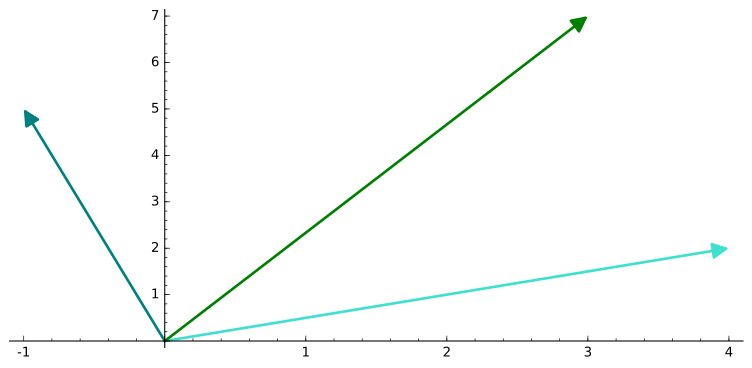
a+b #add vectors
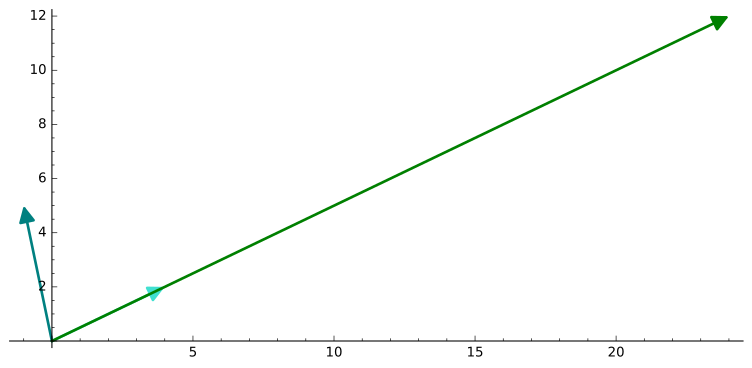
6*a #scale vector
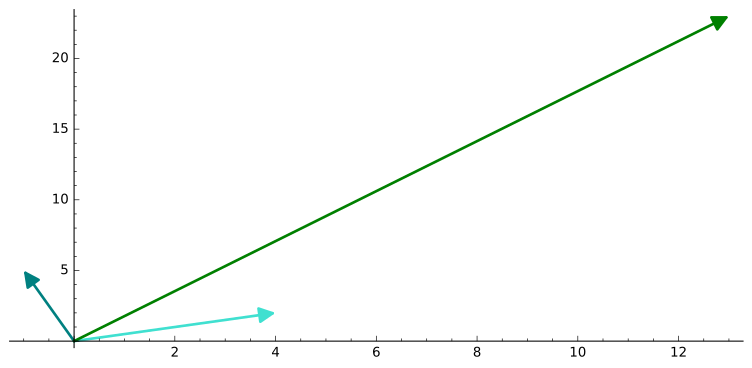
4*a+3*b #add scaled vectors
-b #scale vector
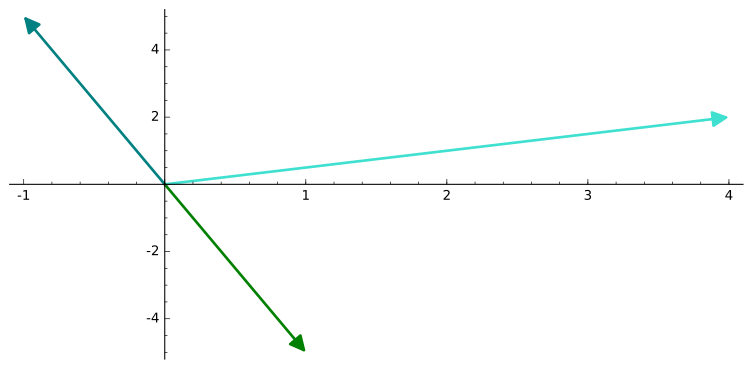
-a+b #scale and add vectors
pi*a #scale vector
(3, 7)
(24, 12)
(13, 23)
(1, -5)
(-5, 3)
(4*pi, 2*pi)
#4
v=vector([1,2,4]) #define v as vector of matrix [1,2,4]
plot(v, thickness=4) #plot vector with increased thickness
3D rendering not yet implemented
#5
a=vector([4,2]) #define a as vector of matrix [4,2]
b=vector([-1,5]) #define b as vector of matrix [-1,5]

#assign variables to the vector additions/scales from Exercise 3
v1=a+b
v2=6*a
v3=4*a+3*b
v4=-b
v5=-a+b
v6=pi*a

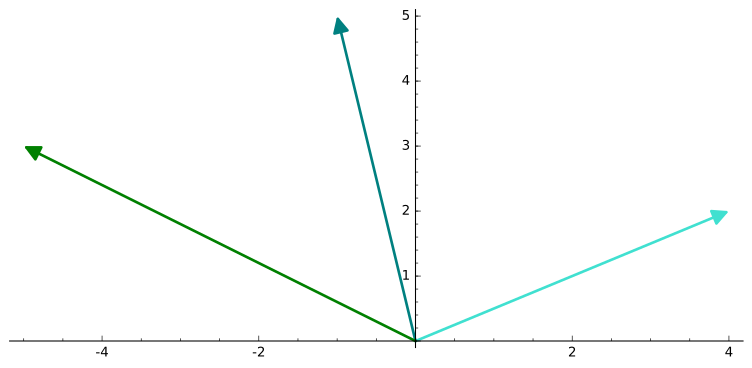
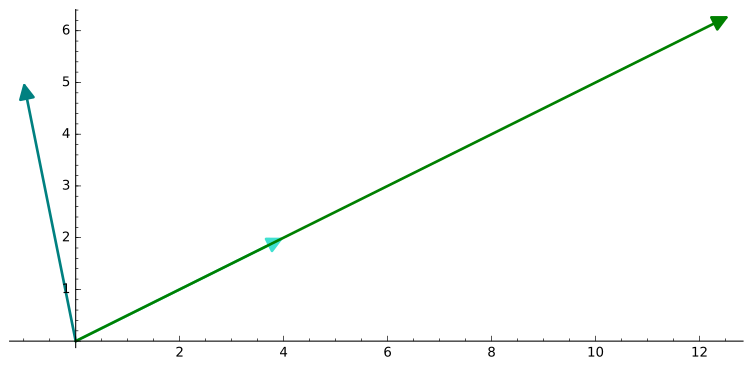
#plot the above defined vectors overlayed onto the original vectors (a and b)
plot(a, thickness=4, color="turquoise") + plot(b, thickness=4, color="teal") + plot(v1, color="green")
plot(a, thickness=4, color="turquoise") + plot(b, thickness=4, color="teal") + plot(v2, color="green")
plot(a, thickness=4, color="turquoise") + plot(b, thickness=4, color="teal") + plot(v3, color="green")
plot(a, thickness=4, color="turquoise") + plot(b, thickness=4, color="teal") + plot(v4, color="green")
plot(a, thickness=4, color="turquoise") + plot(b, thickness=4, color="teal") + plot(v5, color="green")
plot(a, thickness=4, color="turquoise") + plot(b, thickness=4, color="teal") + plot(v6, color="green")
#6
#write function that proves linearity given input of a function
#use variables in place of numbers
def lineartest(f): #define function name and single input
    var("a,b,c") #define a/b/c as variables
    if (f(a+b))==(f(a)+f(b)) and f(c*a)==c*f(a): #begin if loop and say that if conditions of linearity are met
        print("linear function") #print that the function is linear
    else: #end if loop and say that in all other cases
        print("nonlinear function") #print that the function is not linear

lineartest(3*x) #should be linear
lineartest(4+x) #should be nonlinear
linear function
nonlinear function
#7
#test linearity-determining function on three different functions of one variable; one should be in the form k*x
lineartest(4*x) #should be linear
lineartest(x^2) #should be nonlinear
lineartest(tan(x)) #should be nonlinear
linear function
nonlinear function
nonlinear function
#8
def f(v): #define function that applies a vector to a linear function and exports the new vector GIVEN an input of a vector
    l1=[4*v[0]-2*v[1], 3*v[0]+v[1]] #assign l1 to the calculation of the new vector values given an input of old vector values
    v1=vector(l1) #assign new vector to variable v1
    return v1 #return new vector

v=vector([a,b]) #assign variable to vector from matrix [a,b]
f(v) #run variable through above function. expected result: (4a-2b, 3a+b)
(4*a - 2*b, 3*a + b)
#9
def linearv2(v): #define another function that does the same as f(v) but applies a different linear function
    l1=[5*v[0]-2*v[1], 1*v[0]-3*v[1]] #new vector should be these calculations done to the corresponding values of the last vector
    v1=vector(l1) #assign variable to the new vector
    return v1 #return new vector

v=vector([a,b]) #assign variable to the vector of matrix [a,b]
linearv2(v) #run variable through above function. expected result: (5a-2b, a-3b)

#assign variables to three different vectors
vec1=vector([3,2])
vec2=vector([7,1])
vec3=vector([9,5])

#run vectors through function
vec1_1=linearv2(vec1)
vec2_1=linearv2(vec2)
vec3_1=linearv2(vec3)

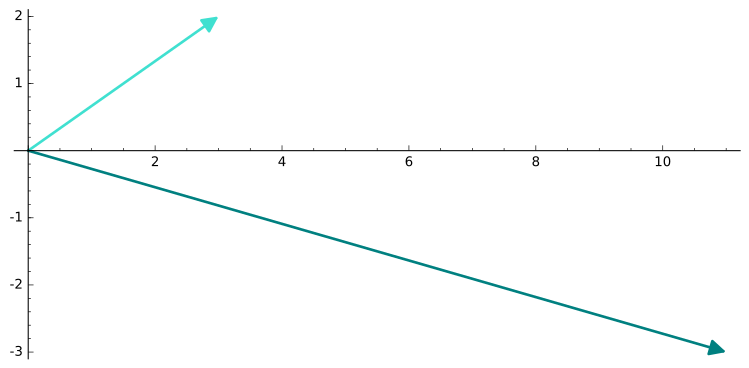
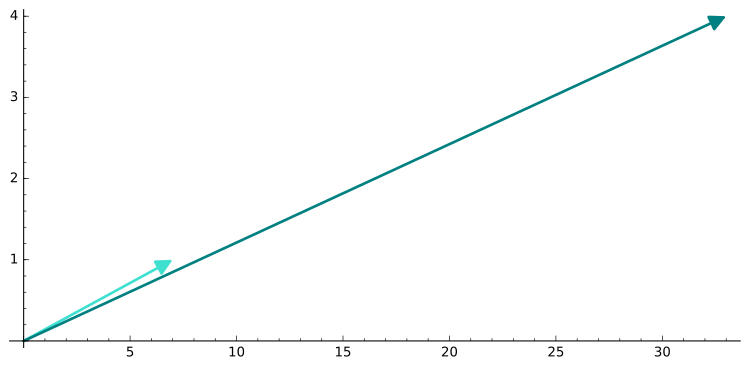
#plot original vectors overlayed with corresponding new vectors
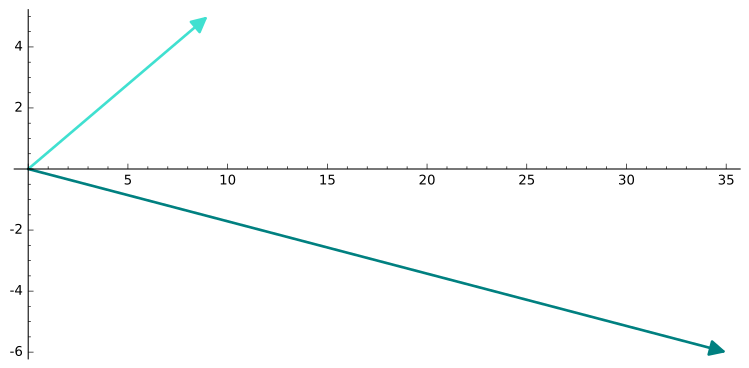
plot(vec1, color="turquoise") + plot(vec1_1, color="teal")
plot(vec2, color="turquoise") + plot(vec2_1, color="teal")
plot(vec3, color="turquoise") + plot(vec3_1, color="teal")
(5*a - 2*b, a - 3*b)
#10
def linearv3(v): #define another function that does the same as f(v) and linearv2(v) but with a different linear function
    l1=[4*v[0]+5*v[1]-7*v[2], 2*v[0]-v[1]+6*v[2], 3*v[0]+5*v[1]-3*v[2]] #assign variable to the calculated new values using old vector values. this one gives us three values!
    v1=vector(l1) #assign variable to the new vector
    return v1 #show new vector

vec1=vector([2,2,2]) #assign variable to the vector of matrix [2,2,2]
linearv3(vec1) #run variable through function. expected result (4,14,10)
(4, 14, 10)
#11
def blackbearvec(v): #define function; input vector is in the from (j(t), a(t)) where j(t) is the number of juvenile blackbears at time=t and a(t) is the number of adult blackbears at time=t
    var("t, t_next") #t_next is the variable used to
    j(t_next)=.57*v[0]+.5205*v[1] #calculation for value of j at time=t+1
    a(t_next)=.33*v[0]+.917*v[1] #calculation for value of a at time=t+1
    l1=[j(t_next), a(t_next)] #assign list to new j and a values
    v1=vector(l1) #assign variable to new vector
    return v1 #show new vector

v=vector([1,1]) #assign variable to vector of matrix [1,1] AKA use initial conditions j=1 and a=1
blackbearvec(v) #run through function to get values at t+1
(1.09050000000000, 1.24700000000000)
#12
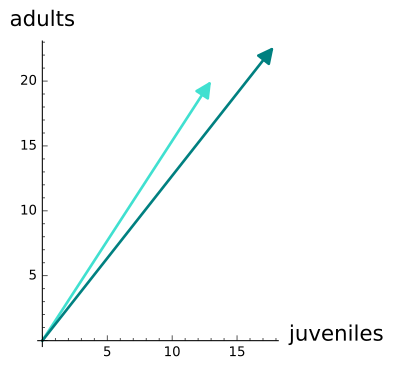
v=vector([13,20]) #assign variable to vector (13,20)
v2=blackbearvec(v) #run variable through function
plot(v, color="turquoise") + plot(v2, color="teal", aspect_ratio=1, axes_labels=["juveniles", "adults"]) #plot original vector overlayed with new vector
v2
"At time=t+1 there will be 17 juveniles and 22 adults."
(17.8200000000000, 22.6300000000000)
'At time=t+1 there will be 17 juveniles and 22 adults.'
#13
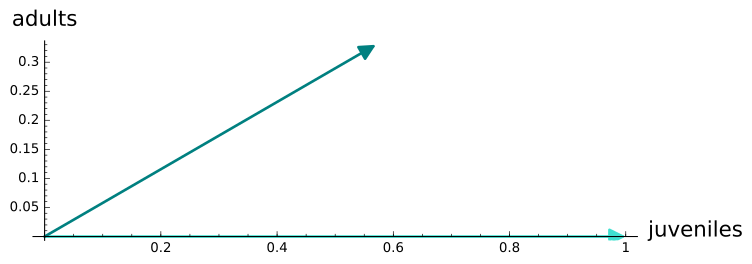
vec1=vector([1,0]) #assign variable to vector (1,0)
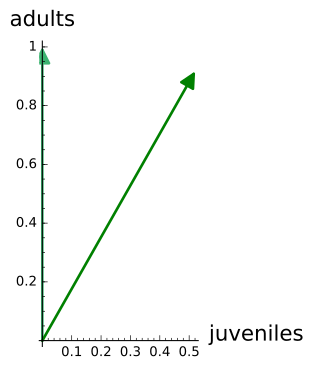
vec2=vector([0,1]) #assign variable to vector (0,1)

#run vectors through function
vec1_1=blackbearvec(vec1)
vec2_1=blackbearvec(vec2)

#plot orignal and new vectors overlayed upon one another
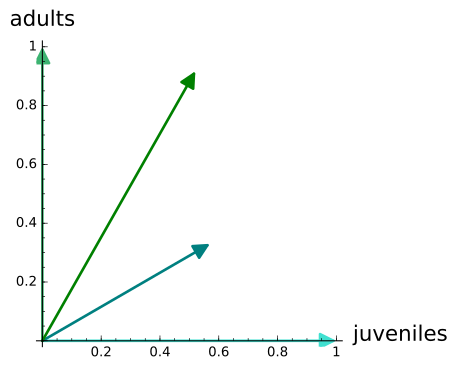
plot(vec1, color="turquoise") + plot(vec1_1, color="teal", aspect_ratio=1, axes_labels=["juveniles", "adults"])
plot(vec2, color="mediumseagreen", aspect_ratio=1) + plot(vec2_1, color="green", aspect_ratio=1, axes_labels=["juveniles", "adults"])

#plot all vectors together
plot(vec1, color="turquoise") + plot(vec2, color="mediumseagreen", aspect_ratio=1) + plot(vec1_1, color="teal", aspect_ratio=1) + plot(vec2_1, color="green", aspect_ratio=1, axes_labels=["juveniles", "adults"])
#14
vec1=vector([1,0]) #assign variable to vector (1,0)
vec2=vector([0,1]) #assign variable to vector (0,1)
vec1_1=13*blackbearvec(vec1) #assign variable to result of scaling the vector resulting from inputting vec1 into blackbear function
vec2_1=20*blackbearvec(vec2) #same as above but using vec2
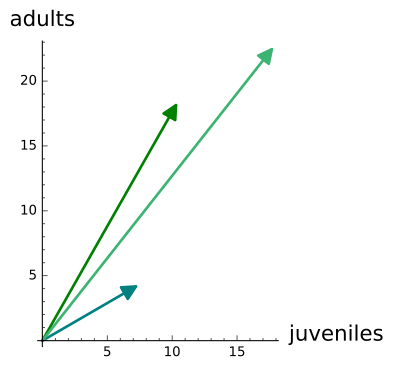
plot(vec1_1, color="teal", aspect_ratio=1) + plot(vec2_1, color="green", aspect_ratio=1) + plot(vec1_1+vec2_1, color="mediumseagreen", aspect_ratio=1, axes_labels=["juveniles", "adults"]) #plot the two product vectors individually and added together

v=vector([13,20]) #assign variable to vector (13,20)
v2=blackbearvec(v) #run vector through blackbear function
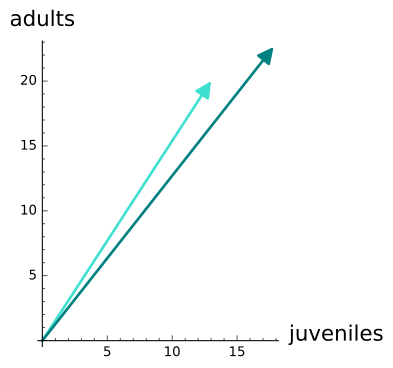
plot(v, color="turquoise") + plot(v2, color="teal", aspect_ratio=1, axes_labels=["juveniles", "adults"]) #plot original and new vectors -- #compare to above to this (vector from 12)

"They are the same final vector! (compare light green vector in top to teal vector in bottom)"
'They are the same final vector! (compare light green vector in top to teal vector in bottom)'
#15
#repeat 14 for two other sets of IC -- same descriptions
vec1=vector([1,0])
vec2=vector([0,1])
vec1_1=5*blackbearvec(vec1)
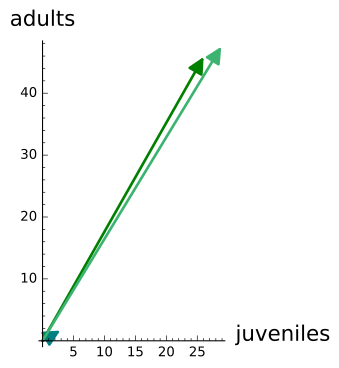
vec2_1=50*blackbearvec(vec2)
plot(vec1_1, color="teal", aspect_ratio=1) + plot(vec2_1, color="green", aspect_ratio=1) + plot(vec1_1+vec2_1, color="mediumseagreen", aspect_ratio=1, axes_labels=["juveniles", "adults"])

v=vector([5,50])
v2=blackbearvec(v)
plot(v, color="turquoise") + plot(v2, color="teal", aspect_ratio=1, axes_labels=["juveniles", "adults"]) #compare to vector from 12

vec1=vector([1,0])
vec2=vector([0,1])
vec1_1=14*blackbearvec(vec1)
vec2_1=12*blackbearvec(vec2)
plot(vec1_1, color="red", aspect_ratio=1) + plot(vec2_1, color="gold", aspect_ratio=1) + plot(vec1_1+vec2_1, color="orange", aspect_ratio=1, axes_labels=["juveniles", "adults"])

v=vector([14,12])
v2=blackbearvec(v)
plot(v, color="pink") + plot(v2, color="orange", aspect_ratio=1, axes_labels=["juveniles", "adults"]) #compare to vector from 12

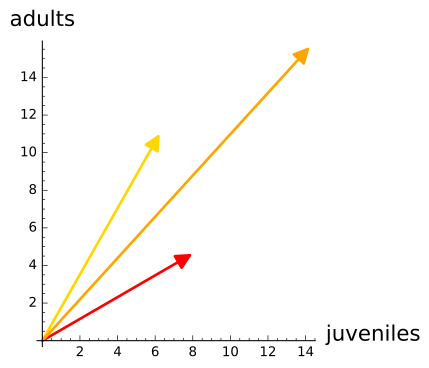
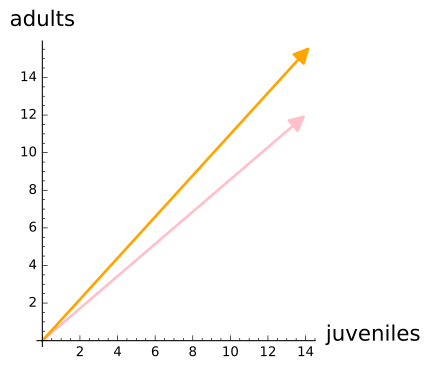
#16
#first linear function
def linear1(v): #define function; input vector is in the from (a(t), b(t)) where a(t) is the a value at time=t and b(t) is the b value at time=t
    var("t, t_next") #t_next is the variable used to represent the values for time=t+1
    j(t_next)=6*v[0]+.13*v[1] #equation for value of j at time=t+1
    a(t_next)=14*v[0]-.65*v[1] #equation for value of a at time=t+1
    l1=[j(t_next), a(t_next)] #define variable for list of t+1 values of j and a
    v1=vector(l1) #make list into vector and assign that vector to a variable
    return v1 #return vector

v=vector([3,4]) #create vector
linear1(v) #testing function - run vector through function

#apply to vector
vec1=vector([1,0]) #create first vector
vec2=vector([0,1]) #create second vector
vec1_1=5*linear1(vec1) #scale the vector produced from running first vector through function
vec2_1=7*linear1(vec2) #same as above but by running second vector through function
plot(vec1_1, color="teal", aspect_ratio=1) + plot(vec2_1, color="green", aspect_ratio=1) + plot(vec1_1+vec2_1, color="mediumseagreen", aspect_ratio=1) #plot original vectors plus the sum of the new vectors, all overlayed

v=vector([5,7]) #create vector
v2=linear1(v) #run vector through function
plot(v, color="turquoise") + plot(v2, color="teal", aspect_ratio=1) #plot original and new vectors

#second linear function -- same as above, but with different functions to define a and j and time=t+1
def linear2(v): #define function; input vector is in the from (a(t), b(t)) where a(t) is the a value at time=t and b(t) is the b value at time=t
    var("t, t_next") #t_next is the variable used to represent values for time=t+1
    j(t_next)=.5*v[0]+.01*v[1] #define value of j at time=t+1
    a(t_next)=-.3*v[0]+.7*v[1] #define value of a at time=t+1
    l1=[j(t_next), a(t_next)] #create list of values of a and j at time=t+1
    v1=vector(l1) #turn list into vector
    return v1 #return vector

v=vector([3,4]) #create vector
linear2(v) #testing function - run vector through function

#apply to vector
vec1=vector([1,0]) #same as above
vec2=vector([0,1])
vec1_1=14*linear2(vec1)
vec2_1=12*linear2(vec2)
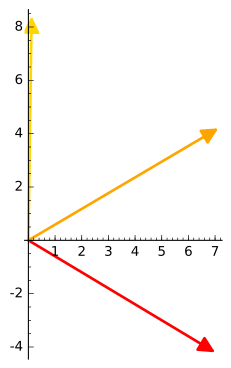
plot(vec1_1, color="red", aspect_ratio=1) + plot(vec2_1, color="gold", aspect_ratio=1) + plot(vec1_1+vec2_1, color="orange", aspect_ratio=1)

v=vector([14,12]) #same as above
v2=linear2(v)
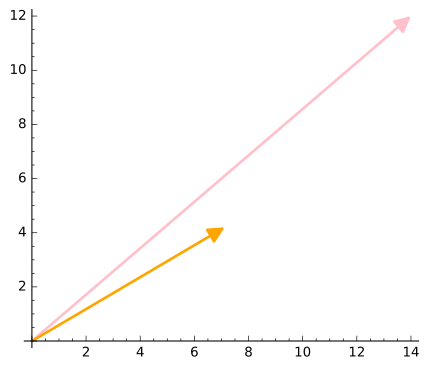
plot(v, color="pink") + plot(v2, color="orange", aspect_ratio=1)
(18.5200000000000, 39.4000000000000)
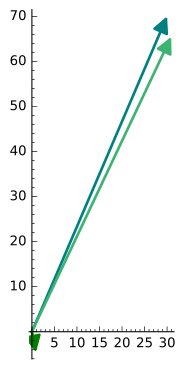
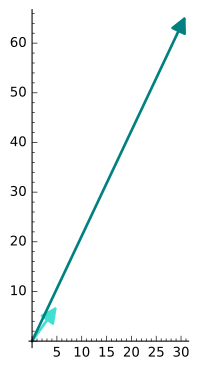
(1.54000000000000, 1.90000000000000)
#17
vec1=vector([1,0]) #create first vector
vec2=vector([0,1]) #create second vector
bb01=blackbearvec(vec1) #run first vector through function
bb10=blackbearvec(vec2) #run second vector through function
bb01 #return new vector corresponding with vector 1
bb10 #return new vector corresponding with vector 2
(0.570000000000000, 0.330000000000000)
(0.520500000000000, 0.917000000000000)
#construct column matrix
ex1=vector([3,5]) #first column vector
ex2=vector([4,6]) #second column vector
column_matrix([ex1,ex2]) #matrix with two columns put together
[3 4]
[5 6]
#18
column_matrix([bb01, bb10]) #construct column matrix out of the new vectors fom #17
[0.570000000000000 0.520500000000000]
[0.330000000000000 0.917000000000000]