
f(x,y)=y^2+1-x^3-x*y  #x and y are standard variables
contour_plot(f,(x,-4,4),(y,-4,4))  #only need to specify a domain
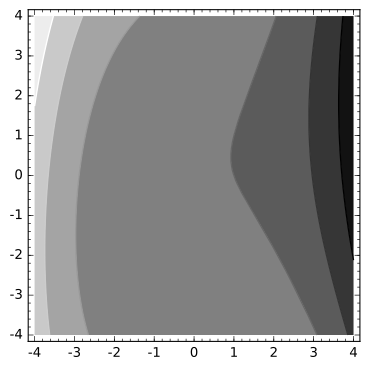
# "fill=False" gives us just the contour lines
# "labels=True" marks the contours with the value of the function f(x,y)
contour_plot(f,(x,-4,4),(y,-4,4),fill=False,labels=True,colorbar=True)
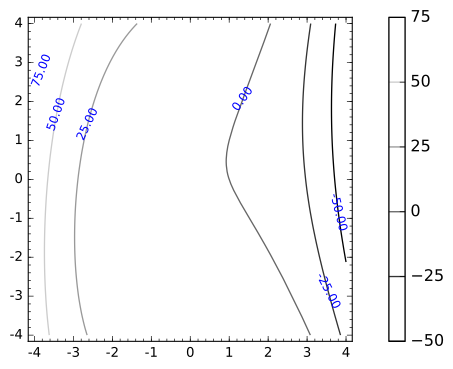
#We can also choose which contours to show and doll it up a bit.
contour_plot(f,(x,-4,4),(y,-4,4),contours=[-12,-8,-4,0,4,8,12],colorbar=True,labels=True,cmap='cool',fill=False, label_colors='black')
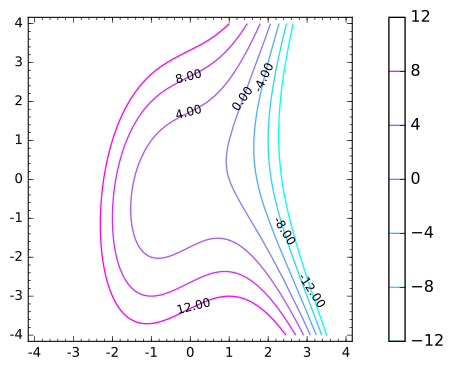
#Let's add more contours using the "range" command.
contour_plot(f,(x,-4,4),(y,-4,4),contours=range(-50,50,4),colorbar=True,labels=True,cmap='cool',fill=False, label_colors='black')
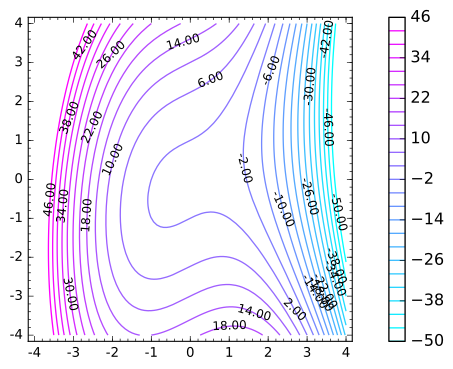
# Here is a plot of the same function.
# Because the values of f get really big compared to x and y, I've scaled the z-axis by .05 using "aspect_ratio=[1,1,.05]"
surf=plot3d(f,(x,-4,4),(y,-4,4),aspect_ratio=[1,1,.05],opacity=0.25)
surf
3D rendering not yet implemented
#Here's a hack that lifts the contours to the corresponding horizontal slice of the graph.
var('x y z')
g = z==f(x,y)
levels=srange(-50,50,4)
epsilon=0.15 #to make the curves show thicker
p=Graphics()
for zlevel in levels:
    p+=implicit_plot3d(g.subs(z==zlevel), (x,-4,4),(y,-4,4),(z,zlevel-epsilon,zlevel+epsilon),color="red",aspect_ratio=[1,1,.05])
p
(x, y, z)
3D rendering not yet implemented
#Show the "lifted contours" on the surface.
surf+p
3D rendering not yet implemented